Semrush Free Alternatives: 8 Tools With Real Free Tiers

By Md. Khalilur Rahman, founder of TechLifeTV | Last updated: October 15, 2026 | Limits checked: October 2026
Quick answer: Looking for a free alternative to Semrush? The best Semrush free alternatives are Google Search Console for your own site, Ahrefs Free for sites you verify, Screaming Frog for crawls up to 500 URLs, and SEO PowerSuite’s free tier. None replaces Semrush fully. Free plans have real limits, so match the tool to the job.
I run a site about SEO tools, and one of my own posts got about 29,700 impressions in three months and zero clicks. Free tools showed me what was happening. They didn’t tell me what to do next. Here’s what works, and where it stops.
Disclosure: Some links in the last section of this guide may be affiliate links. If you buy through one, TechLifeTV may earn a commission at no extra cost to you. It doesn’t change what I recommend. I label every tool “Hands-on” (I’ve used it) or “Researched” (I haven’t).
Table of Contents
Key takeaways
- Real free options exist, but every one I checked has limits.
- A free trial isn’t a free plan. SE Ranking’s 14-day trial, for example, ends.
- Search Console is the only free tool here with first-party data from Google.
- Semrush’s free Keyword Tool allowed 10 searches a day when I checked.
For comparison, Semrush Pro (SEO Classic plan) costs $139.95 a month, or $117.33 a month billed annually
Is there a free alternative to Semrush?
Yes, but not one tool. If you want free SEO tools like Semrush, you’ll mix a few that each cover part of the job: Search Console for your own rankings, Ahrefs Free and Screaming Frog for audits, and a few free keyword lookups from Mangools or Semrush itself.
The word “free” means three different things in SEO. Lots of lists mix them up, so here’s how I use the word:
| Type | What it means | Examples in this guide |
| Free, no time limit | No payment needed. Features or usage are capped. | Search Console, Screaming Frog (500 URLs), Ahrefs Free (your own sites), SEO PowerSuite free tier |
| Free with small limits | A free account with a few lookups per day or month | Semrush Free, Mangools free account, Google Keyword Planner (needs a Google Ads account), Ubersuggest (reported, not confirmed) |
| Trial only | Full features for a short time, then you pay | SE Ranking (14 days, no card), Semrush paid plans (7 days) |
In this guide, “free” means the first two rows. A trial doesn’t count.
What can free Semrush alternatives replace, job by job?
Free tools handle some of Semrush’s jobs well. Search Console tracks your rankings, and Screaming Frog or Ahrefs can audit small sites for free. Keyword difficulty and competitor research are the weak spots, where free tiers give only a few lookups. Plan on mixing two or three tools. Here’s my view of each job:
| Job | Free option | Main limit | My view |
| Track your own rankings | Search Console | Your site only | Strong |
| Find keyword ideas | Mangools free, Semrush Keyword Tool, Keyword Planner | Small daily limits; Planner is ad-focused | Partial |
| Check keyword difficulty | Free tiers give a few lookups | Hard to do at scale | Weak |
| Audit your site | Screaming Frog, Ahrefs Free, SEO PowerSuite | 500-URL cap; Ahrefs Free is for your own sites | Strong for small sites |
| Check backlinks | Ahrefs Free, SEO PowerSuite | Your own site; 1,100 backlinks on SEO PowerSuite | Partial |
| Research competitors | SEO PowerSuite (1 competitor), Semrush Free | Very limited | Weak |
| Check AI visibility | Mangools AI Search Grader, SEO PowerSuite, Search Console (Beta) | Early; it measures, it doesn’t improve | Partial |
The weak spots are keyword difficulty and competitor research. Those are the jobs that usually push people toward a paid plan.
The 8 best free alternatives to Semrush
The best free alternative to Semrush depends on the job. In my experience, Search Console is the strongest for tracking your own rankings. For site audits, use Screaming Frog. For keyword ideas, Mangools or Semrush’s own free Keyword Tool gives a few daily lookups. No single free tool replaces Semrush.
These are the free Semrush alternatives I’d use. Each entry shows what’s free, the main limit, and whether I’ve used it.
1. Google Search Console (Hands-on): free rank tracking for your own site
Free: Yes, with no time limit. Main limit: It only shows your own site. There’s no competitor data.
It shows your clicks, impressions, search queries, and average position. That’s real data from Google, not an estimate. I check it first, every time.
Hands-on: I filtered Search Console’s Performance report to this one post and set the range to three months. It shows 0 clicks, 29.7K impressions, and an average position of 68.7. Hovering over a day shows its numbers. For example, on August 26, the post had 58 impressions at position 68.8. The bursts and gaps on the chart told me the post wasn’t holding a steady spot in Google. One thing you check in Search Console every week.
Best for: Everyone.
2. Ahrefs Free (Researched): backlinks and audits for sites you own
Free: Ahrefs Free gives site owners limited access to Site Explorer and Site Audit. Main limit: You verify the site first, so it’s for sites you own.
Ahrefs’ paid plans start at $29 a month (Starter) and $129 (Lite). Ahrefs says it doesn’t run discounts or free trials. I haven’t used it, so this is based on Ahrefs’ own pages.
Best for: Backlinks and audits on your own site.
3. Screaming Frog (Hands-On): Free Technical Audits Up to 500 URLs
Free: Yes, up to 500 URLs per crawl.
Main limit: The 500-URL cap. It’s also desktop software, not a web app.
Paid license: $279 per year, per user.
Best for: Small sites and technical checks.
I mainly use the free version, and it does one job really well: it crawls your site and lists technical problems. It doesn’t do keyword research, so I pair it with other tools for that.
Hands-On: How I Use Screaming Frog for Technical SEO
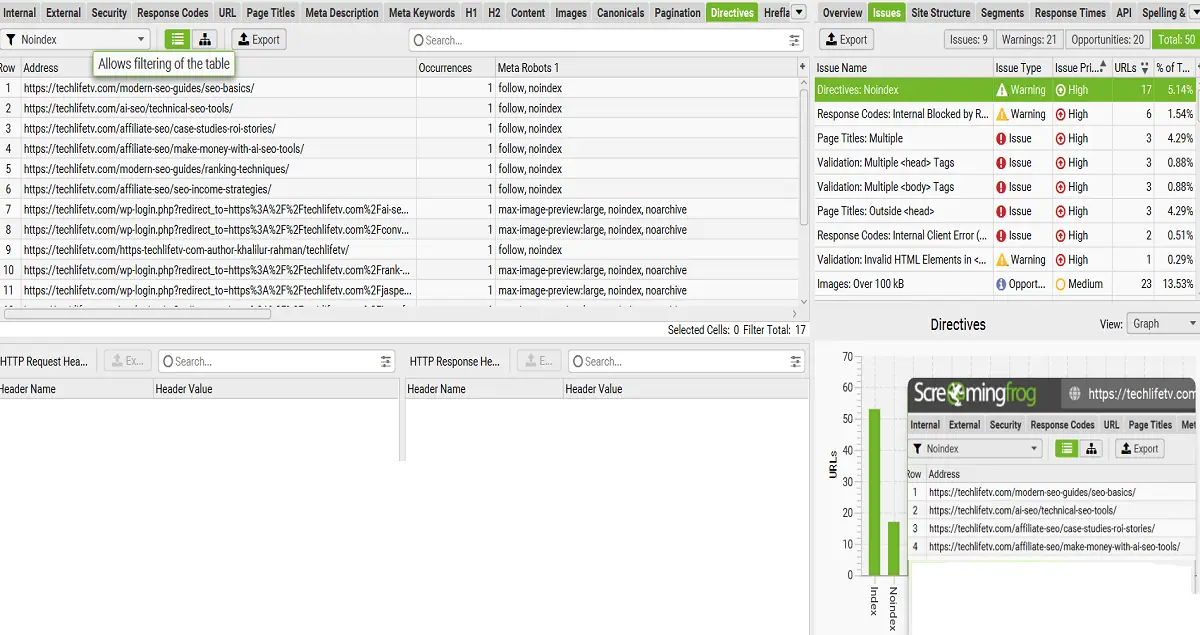
I run Screaming Frog SEO Spider on Windows to crawl my site, techlifetv.com. Within a few minutes, it flagged 50 items: 9 issues, 21 warnings, and 20 opportunities.
[Screaming Frog Issues tab for techlifetv.com showing 9 issues, 21 warnings, and 20 opportunities, with the Directives: Noindex warning highlighted](alt: Screaming Frog free technical SEO audit showing noindex, title, and image issues)
Here is my simple routine.
1. Start with the Issues tab.
Screaming Frog sorts everything into Issues (real problems), Warnings (things to double-check), and Opportunities (nice-to-have improvements). I work from the top down and check each item’s priority before I touch anything.
2. Don’t panic over warnings.
The top row in my crawl is Directives: Noindex, 17 URLs (5.14%). It looks scary, but it’s only a warning. Screaming Frog is asking, “Did you mean to do this?” When I opened the list, most of these URLs were category pages marked,follow, no-index plus WordPress login pages marked noindex, noarchive. That’s intentional. Category pages help people and crawlers move around, but they rarely need to rank on their own. If an important article showed up here, that would be a real problem, because search engines and AI answer engines can’t use pages they can’t index.
3. Fix the real issues.
Here is what needed attention on my site:
- Page Titles: Multiple (3 URLs)
- Multiple
<head>and<body>tags (3 URLs each) - Page Titles: Outside
<head>(3 URLs) - Internal Client Error (2 URLs)
- Invalid HTML elements in
<head>(1 URL, a warning)
These look related, so fixing the underlying cause (often a theme or plugin injecting code) may clear several items at once.
4. Take the easy win on images.
Under Opportunities, 23 images (13.53%) were over 100 kB. Compressing and resizing them is one of the fastest ways to improve page speed without touching your content.
5. Check the other usual suspects.
Beyond this crawl, I also use it to catch broken links, 404 errors, redirect issues, missing title tags, and duplicate metadata. Where relevant, I check security items too, like HTTP pages and insecure links. I look at the affected URLs and the pages linking to them, so I know exactly what to fix first.
6. Crawl again.
After fixing problems, I run another crawl to confirm the changes worked. This step is the one most people skip, and it’s what turns an audit into real progress.
Honest take: the free version won’t replace a keyword or backlink tool. But for finding technical problems on a small site, it’s hard to beat. Run one crawl this week. Even fixing three or four items can make your site healthier, and every fix is a step in the right direction.
4. SEO PowerSuite free tier (Researched): a desktop toolkit with limits
Free: Yes. You get 1 project, an audit of up to 500 URLs, up to 1,100 backlinks, and 1 competitor. It also tracks Google AI Overviews. Main limit: The free version doesn’t let you save projects, so it’s hard to watch progress over time.
Professional costs $349 a year. This is desktop software too. I haven’t used it, so this comes from the official pricing page.
Best for: Trying a full desktop toolkit before you pay.
5. Semrush free plan (Hands-on): 10 keyword searches a day
Free: A limited free plan. Its free Keyword Tool allowed 10 searches a day when I checked. Main limit: The daily caps.
Semrush also offers a 7-day trial of paid plans. Its site now describes the company as “An Adobe Company.
Hands-on: With Semrush Free, you get 10 searches per day, so use them wisely. Start with the Keyword Magic Tool to find broad-match keyword ideas and check their Keyword Difficulty (KD). Then use Keyword Overview to analyze global and country-level search volume, search intent, trends, CPC, and available ad data. Check keyword questions and SERP results to understand what people want and how competitors rank. Use Site Audit to find important technical SEO issues on your website. Focus on the most promising keywords first, and check Google’s live search results before making your final decision: one keyword you checked on the free plan.
Best for: Trying Semrush’s data before you pay.
6. Mangools free account (Hands-on): keyword ideas on a small budget
Free: A free account plus free tools, like a SERP simulator and an AI Search Grader. Main limit: Small daily limits. I couldn’t confirm the exact numbers on Mangools’ own pages, so check your account.
Mangools’ comparison page lists plans from $37.70 a month. Confirm the billing cycle before you buy. I like its keyword research and SERP analysis for the price. [ADD YOUR NOTE: your daily limit and one keyword example.]
Best for: Keyword ideas on a small budget.
7. Ubersuggest (Researched): simple screen, unclear free limits
Free: Some reviews mention about three free searches a day. I couldn’t confirm that on Ubersuggest’s own pages. Main limit: Unclear free limits.
Paid monthly plans run $29 to $99, with a 7-day trial on monthly plans, and lifetime plans exist. Ubersuggest says its numbers are estimates, so treat them as rough.
Best for: Beginners who want a simple screen.
8. Google Keyword Planner (Hands-on): free keyword ideas inside Google Ads
Free: Yes, inside Google Ads. You need a Google Ads account. Main limit: It’s built for advertisers, so treat the competition column as ad competition, not SEO difficulty.
[ADD YOUR NOTE: what volumes looked like on your account (ranges or exact numbers) and one keyword you checked.] [CONFIRM the competition-column wording against Google’s help page.]
Best for: A rough sense of search interest.
Is Semrush free? What the free plan includes
Semrush has a limited free plan and a 7-day trial of paid plans. Its free Keyword Tool allowed 10 searches a day when I checked in October 2026. That’s enough to test a handful of ideas, not to research a whole topic. Pro costs $139.95 a month, or $117.33 billed annually.
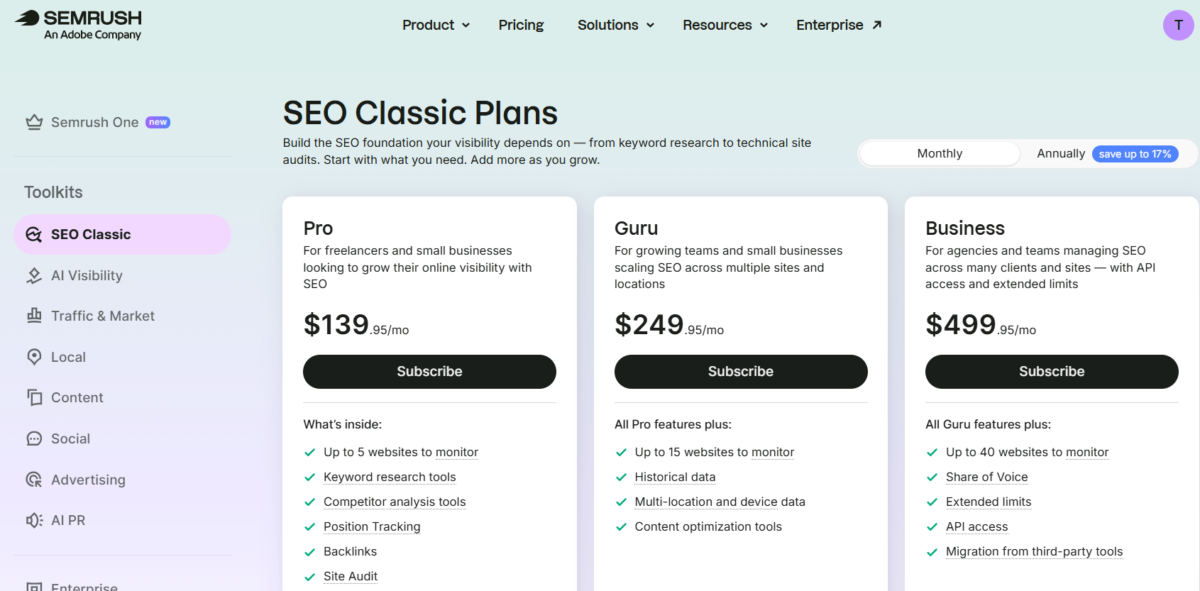
Hands-on: Semrush’s SEO Classic page lists three plans on monthly billing: Pro at $139.95, Guru at $249.95, and Business at $499.95 a month. Pro covers up to 5 websites. Guru adds up to 15 websites, historical data, and content optimization tools. Business adds up to 40 websites and API access. The logo now reads “An Adobe Company.” Switch the toggle to Annually to see the lower price.
The Pro plan page lists up to 5 websites to monitor.
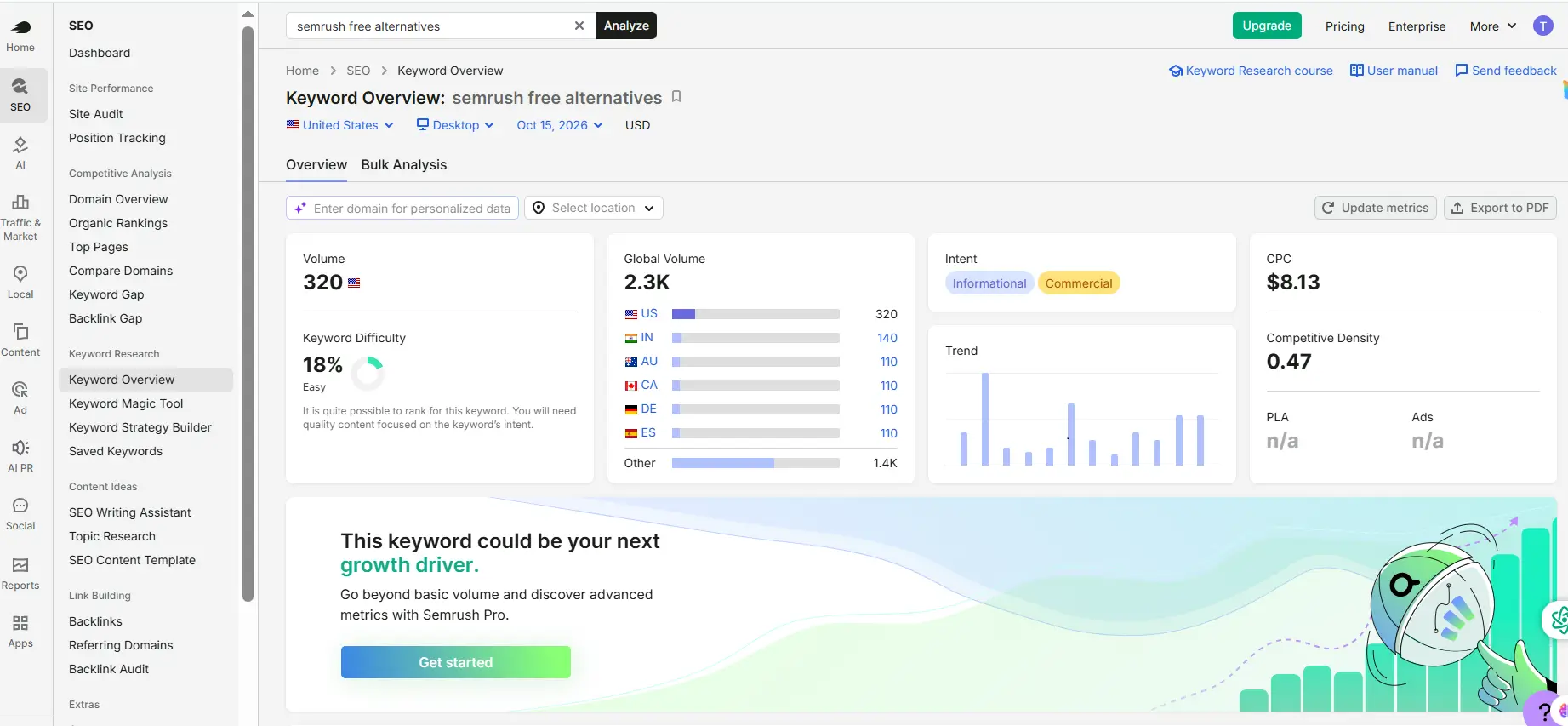
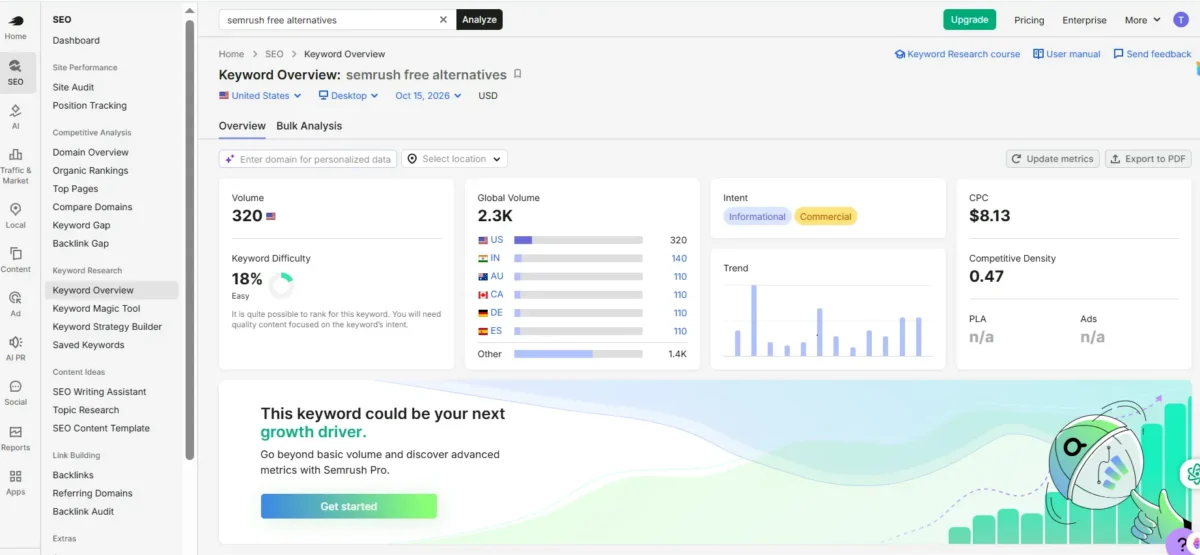
Hands-on: On October 15, 2026, I typed “semrush free alternatives” into Semrush’s Keyword Overview, set to the United States on desktop. It showed a keyword difficulty of 18% (labeled Easy), a global volume of 2.3K, and 320 monthly searches in the US. India added 140, and Australia, Canada, Germany, and Spain showed 110 each. It also showed the intent (informational and commercial), a CPC of $8.13, a competitive density of 0.47, and a trend chart. A banner said advanced metrics need Semrush Pro: what you could and couldn’t do on the free plan.
How I use Semrush’s free tools to decide what to write
- Keyword Magic Tool: I start with a broad word, like “semrush alternatives,” and look at the matching keywords and their difficulty scores.
- Keyword Overview: Then I open one keyword to see difficulty, global volume, volume by country, intent, trend, CPC, and ads. It also lists related questions and the top results, so I can see what people ask and who already ranks.
- Site Audit: The free Site Audit checks my pages for technical problems.
Free limits are small, so I plan my lookups before I start. Daily ten searches free
If you’re outside the US: what to check before you pay
Most of the tools I checked list prices in US dollars, and I didn’t find regional pricing on the Semrush pages I checked. Before you pay, check the currency, payment methods, taxes, trial terms, and country data. I haven’t tested checkout from Argentina, Venezuela, Colombia, or the UAE, so test yours before you commit.
One reviewer from India on G2 asked for regional pricing and said local data for smaller cities felt thin.
Before you pay, look at these:
- Currency: What you’ll be charged, and any bank conversion fees.
- Payment methods: Card, PayPal, or something else.
- Taxes: VAT or GST may be added at checkout.
- Trial terms: Does it ask for a card? Does it renew on its own?
- Country data: Pick your country when you search. Local data can be thin for smaller cities.
One more tip. Search Console shows what people actually type to find your site, in any country. In my own post’s data, a small share of queries (roughly 4 percent) were in Spanish, French, German, Italian, and other languages. It’s free, and it shows what your readers really search.
A real example: what Search Console told me about my own post
My post, Best Semrush Alternatives, had about 29,700 impressions and zero clicks in three months. The average position was about 68.7. That’s page seven. Here’s how I used Search Console to look into it:

- Filter by page. In Performance, I filtered to that one URL.
- Check the queries. The top queries were on topic, like “semrush alternative” (2,283 impressions) and “semrush alternatives” (1,811). So the topic match looked fine.
- Look at the daily chart. Impressions came in short bursts, then almost disappeared. That looks like unstable rankings.
- Check single days. On September 19, 26, and 30, the average position looked great: 5, 21, and 8. But each day had only one impression. One impression says almost nothing.
- Check indexing. My tag page for the same phrase wasn’t indexed, so it wasn’t competing with the post.
- Check AI features. The Generative AI features report, still in Beta, showed zero impressions for the page over three months.
What I learned: Search Console showed clearly what was happening. It didn’t show why other pages were ahead, or which keywords to chase next. For that, you need other tools, like Semrush’s free keyword lookups or Mangools. I plan to improve the post, add internal links, and look for a few backlinks.
Which free Semrush alternatives should you combine? Stacks by goal
Pick one job at a time. This usually works better than signing up for everything.
- Affiliate marketers and bloggers: Search Console, a Mangools free account, and Screaming Frog. Use Search Console to see what works, Mangools for ideas, and Screaming Frog for fixes. I’ve used all three.
- Small business owners: Search Console, Ahrefs Free, and Screaming Frog. Verify your site in Ahrefs Free to see backlinks and audit issues. For more tools built for small teams, see my guide to AI SEO tools for small business.
- Learners: Search Console, Semrush’s free Keyword Tool, and the SEO PowerSuite free tier. You can explore without paying and learn the words people use.
Free tools for AI search visibility (and how to test by hand)
AI visibility means whether Google’s AI Overviews, ChatGPT, Perplexity, or Gemini mention or link to your site. Free options are early and limited. You can try Mangools’ free AI Search Grader, the SEO PowerSuite free tier (it tracks Google AI Overviews), and Search Console’s Beta Generative AI features report.
You can also test by hand:
- Write down five questions your customers ask.
- Run each one in Google, Perplexity, ChatGPT search, and Gemini.
- Note whether your site is cited, and which sources show up instead.
- Repeat once a month in a simple sheet.
These tools measure visibility. They don’t make AI engines cite you. In my experience, clear, original, well-sourced pages matter most. For tracking at a larger scale, see my guide to AI search visibility management tools.
Free tools can help you get a basic picture of your AI search visibility, but they may not provide the focused tracking you need for Google AI Mode. If you want to compare tools for monitoring AI Mode visibility and citations, read my guide to the best AI Mode SEO tool to find an option that fits your workflow and budget.
What to avoid
- Shared “group buys” accounts. They usually break a vendor’s terms, and accounts can be shut down. I haven’t read every vendor’s terms, so check before you try anything like this.
- “Unlimited free” claims. Every tool I checked had limits.
- Chatbots as data sources. A chatbot can suggest ideas. Most chatbots don’t have a keyword database like Semrush has, so don’t trust their volume or difficulty numbers.
When Semrush free alternatives aren’t enough
Free tools start to feel tight when you track more than a few keywords, need competitor data every week, send client reports, or want regular AI visibility tracking. At that point, a paid tool like SE Ranking, Mangools, or Otterly can make sense. Compare limits first, and use a trial or free account where one exists. Here are three paid options I’ve used:
- SE Ranking (Hands-on): Core is $129 a month, or $103.20 a month billed annually. It has a 14-day free trial with no credit card. Try SE Ranking free for 14 days.
- Mangools (Hands-on): A low-cost option for keyword research and SERP analysis. Plans: Starting price (monthly/annual)$30.5 /$18.85 (Mangools Basic). See Mangools plans.
- Otterly (Hands-on): A tracker for AI search visibility only. Public info lists Lite at $29 a month for 15 prompts. Confirm on Otterly’s pricing page. See Otterly’s current plans.
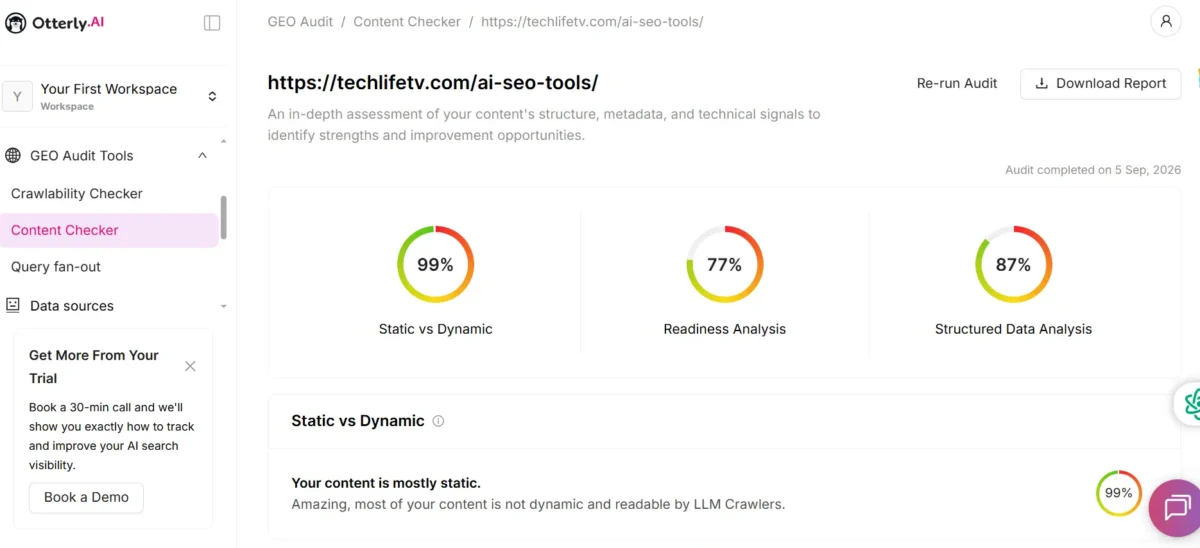
Hands-on: I ran Otterly’s Content Checker on my AI SEO tools page in my trial workspace. It gave three scores: 99% for static versus dynamic content (it said the page is mostly static and readable by AI crawlers), 77% for readiness, and 87% for structured data. I use these scores as a checklist, not a verdict. I haven’t confirmed how Otterly calculates them.
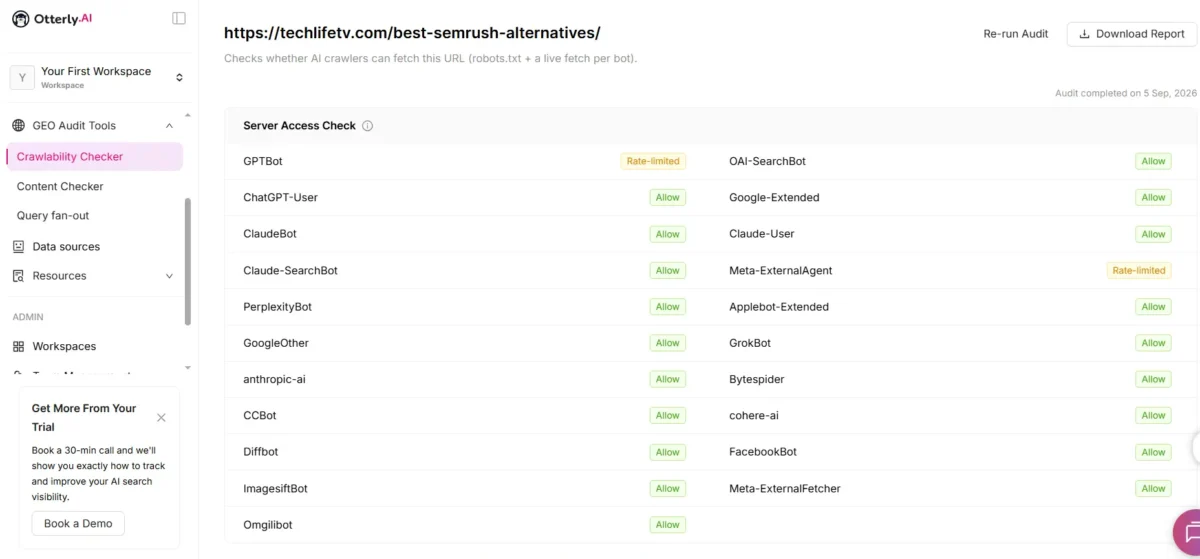
Hands-on: Otterly’s Crawlability Checker tests whether AI crawlers can fetch a page by reading robots.txt and making a live fetch for each bot. On my Semrush alternatives post, most bots showed Allow. GPTBot and Meta-ExternalAgent showed Rate-limited. Otterly notes that its test runs from proxy IPs, so a block may come from bot-impersonation protection and not from a rule against the real bot. That audit ran on September 5, so I’d re-run it before relying on it.
For comparison, Semrush Pro (SEO Classic plan) is $139.95 a month, or $117.33 billed annually. For the full paid picture, read my guide to Semrush alternatives.
Frequently asked questions
Is there a free alternative to Semrush?
Yes, several partial ones. Search Console, Ahrefs Free, Screaming Frog, and the SEO PowerSuite free tier each cover part of the job. None replaces Semrush fully.
What are the best free alternatives to Semrush?
It depends on the job. Search Console is best for your own rankings, Screaming Frog for site audits, and Mangools or Semrush’s free Keyword Tool for a few keyword lookups.
What are the best free SEO tools like Semrush?
Search Console (your own rankings), Screaming Frog (site audits), Ahrefs Free (backlinks on sites you own), and Mangools or Semrush’s free Keyword Tool (a few keyword lookups). None replaces Semrush fully.
Is Semrush free?
Semrush has a limited free plan and a 7-day trial of paid plans. Its free Keyword Tool allowed 10 searches a day when I checked in October 2026. Pro costs $139.95 a month.
Can free tools replace Semrush completely?
Not for most people. In my experience, free tools are weak at keyword difficulty and competitor research. They work well for small sites and for learning.
Is Google Search Console enough on its own?
It’s enough to track your own site’s rankings and queries. It has no competitor data and no keyword ideas outside what you already rank for. Many people pair it with one more tool.
What is the best free tool for keyword research?
Try Mangools’ free account or Semrush’s free Keyword Tool for a few lookups. Keyword Planner is free too, but it’s built for advertisers. Daily limits are small, so plan your searches.
What is the best free tool for checking backlinks?
Ahrefs Free shows backlinks for sites you own, after you verify them. The SEO PowerSuite free tier tracks up to 1,100 backlinks. Neither gives you full competitor backlink data.
Does Semrush have a free trial?
Semrush’s pricing page listed a 7-day free trial of paid plans when I checked. Trial terms can change, so confirm on the plan page before you sign up. Semrush also has a limited free plan with no time limit.
Which free Semrush alternative is best for small businesses?
Start with Search Console, Ahrefs Free, and Screaming Frog. Verify your site in Ahrefs Free to see backlinks and audit issues, and use Screaming Frog to crawl a small site. Add a paid tool only when a limit slows you down.
The bottom line
You don’t need to replace Semrush in one move. If you’re searching for Semrush alternatives free, start by comparing the free plans offered by tools like Ahrefs, Ubersuggest, and Google Keyword Planner. Learn what you really use, and pay only when a limit slows you down.
Your next step: Open Google Search Console today, select one page, and review its Queries tab.
How I checked this guide
I read each vendor’s official pricing or plan page on October 13 and 14, 2026. “Hands-on” means I’ve used the tool. “Researched” means I haven’t. I couldn’t confirm the exact free limits for Ubersuggest and Mangools, so I say so above. Limits and prices change often, and I’ll recheck this guide every quarter.
Sources: Semrush pricing, SE Ranking, Ahrefs, Screaming Frog, SEO PowerSuite, Mangools, Ubersuggest.