AI Search Visibility Management Tools: Best Picks for 2026 (Even on a Small Budget)

By Md. Khalilur Rahman | Updated: September 2026 | AI SEO Tools, SEO Analytics & Visibility
Disclosure: Some links in this post may be affiliate links. If you buy through them, I may earn a commission at no extra cost to you. I also list each tool’s weak spots, so you can decide for yourself.
Table of Contents
Best AI Tools to Manage Search Visibility Across Channels (Quick Answer)
The best AI search visibility management tools for a small budget are Otterly.ai ($29 a month) and Frase ($49 a month, or $39 billed yearly). Otterly tracks ChatGPT, Google AI Overviews, Perplexity, and Copilot, with Best AI Tools to Manage Search Visibility Across Channels (Quick Answer)
The best AI search visibility management tools for a small budget are Otterly.ai ($29 a month) and Frase ($49 a month, or $39 billed yearly). Otterly tracks ChatGPT, Google AI Overviews, Perplexity, and Copilot, with Claude, Gemini, and Google AI Mode as paid add-ons. Need more prompts? SE Visible starts at $99. Prices checked September 2026.
Not sure which one fits you? Start here:
One place to track, fix, and measure your visibility: Frase or Sedestral. Claude, Gemini, and Google AI Mode as paid add-ons. Need more prompts? SE Visible starts at $99. Prices checked September 2026.
- Tightest budget, most AI platforms: Otterly.ai
- Content writing and tracking in one tool: Frase
- Most prompts for the money: SE Visible
- Already paying for Semrush: Semrush AI Visibility Toolkit
- Want to pick your own AI models: Peec AI
- Tracking plus content and SEO agents: Sedestral
- AI visibility and share of voice in one package: Otterly.ai or SE Visible
Why AI Search Visibility Matters Now
Here’s a simple test. The last time someone asked ChatGPT, Claude, or Google AI Mode for the best tool in your niche, was your brand in the answer?
Most bloggers, small business owners, and affiliate marketers can’t say. They still check Google rankings, while people ask AI for recommendations instead of scrolling through ten blue links. If AI never mentions you, it’s like your shop vanished from a busy street.
AI search visibility management tools help you fix that. They show whether AI knows you exist, and what to do if it doesn’t.
The catch is that most guides are written for teams with big budgets. If you run a solo blog, a small affiliate site, or a small agency, you need something cheaper and easier to act on. That’s what this guide covers.
What Is an AI Search Visibility Management Tool?
A classic SEO tool shows where you rank on Google. An AI search visibility management tool shows whether AI mentions you at all when someone asks a question in your niche.
It sends real or simulated questions (called prompts) to AI platforms like ChatGPT, Claude, Gemini, Perplexity, and Google AI Overviews. Then it checks:
- Does your brand show up in the answer?
- How often, and for which questions?
- What does the AI say about you? Is it good, bad, or wrong?
- Which competitors show up instead of you?
- Which of your pages get cited?
The word “management” matters here. Watching a number isn’t enough. A good workflow has four steps: track, find gaps, fix, and measure again. The tools below mostly differ in how much help they give you after step one.
AI Search Visibility vs. Traditional SEO
These two don’t measure the same thing.
| Traditional SEO | AI Search Visibility |
| Keyword rankings | Brand mentions and citations |
| Exact-match keywords | Entities and topics |
| Search results pages | AI-generated answers |
| Position tracking | Citation frequency and share of voice |
| Backlinks | Wider trust and authority signals |
| Click-through rate | Being recommended, with or without a click |
A page can rank #1 on Google and still never get mentioned by ChatGPT. AI systems pull from many sources when they build an answer. So treat AI visibility as work that runs next to your SEO, not instead of it.
Which AI Platforms Should You Track?
“Across channels” really means across AI platforms. Here are the main ones:
- ChatGPT: The most widely used AI assistant, so it’s usually the first one to track.
- Google AI Overviews: Short AI summaries at the top of regular Google results. Lots of searchers see them without asking.
- Google AI Mode: Google’s chat-style search, where people ask follow-up questions.
- Gemini: Google’s AI assistant app.
- Perplexity: An answer engine that shows its sources, which makes citations easy to spot.
- Claude: Anthropic’s assistant, popular with writers, developers, and other professionals.
- Microsoft Copilot: Built into Windows, Edge, and Microsoft 365.
Others exist, like Grok, DeepSeek, and Meta AI. Most small sites don’t need them yet.
My advice: start with ChatGPT, Google AI Overviews, and Perplexity. Then add Claude and AI Mode if your audience uses them. You can check this in Google Analytics 4. Look for referral traffic from chatgpt.com, perplexity.ai, claude.ai, and gemini.google.com. The platforms that already send you visitors are the ones to track first.
What to Look For Before You Pay
Run every tool through this checklist. It keeps you from paying for features that sound great but don’t help a small site.
- Does it track the platforms your audience uses? Check the exact list on the plan you plan to buy. Some tools lock Claude, Gemini, or Perplexity behind higher plans or add-ons.
- How many prompts do you get? This is the number that limits you most. Compare it to the price.
- Is the data real or guessed? Some tools turn old SEO keywords into “prompts” and call it AI tracking. That’s fine for a starter tool, but know what you’re buying.
- Can you act on what it shows? “You’re not cited for this topic” is only half the job. Look for content briefs, audits, or plain-English fixes.
- Does it track competitors? You need a comparison to know if “sometimes cited” is good or bad.
- Is multi-site support built in? If you manage more than one site or client, check this first. It often costs extra.
How I Picked These Tools
I compared each tool on the checklist above: AI platform coverage, prompt limits, how clearly it connects a finding to a fix, pricing transparency, and multi-site support. See our broader SEO tool evaluation criteria
I use Otterly.ai, Frase.io, and SE Visible in my own workflow, so my notes on it come from hands-on use. For the other tools, I checked each vendor’s current pricing page and read independent reviews. I left out any tool with “contact sales” as its only price, because that isn’t useful on a small budget.
One honest warning: pricing in this space changes every few months. Prices below are monthly billing unless I say otherwise. Confirm the current rate before you subscribe.
The Best AI Search Visibility Management Tools for Small Budgets
Free ways to start
You can get a first look at your AI visibility without paying anything.
- Otterly.ai offers a 14-day free trial with no credit card. It also has free GEO tools, including AI prompt research, a query fan-out tool, and an AI referral traffic checker.
- Frase has a free 7-day trial, also with no credit card.
- SE Visible has a 10-day free trial.
Use these to answer one question: “Am I showing up anywhere yet?”
Under $50 a month: the sweet spot for solo marketers
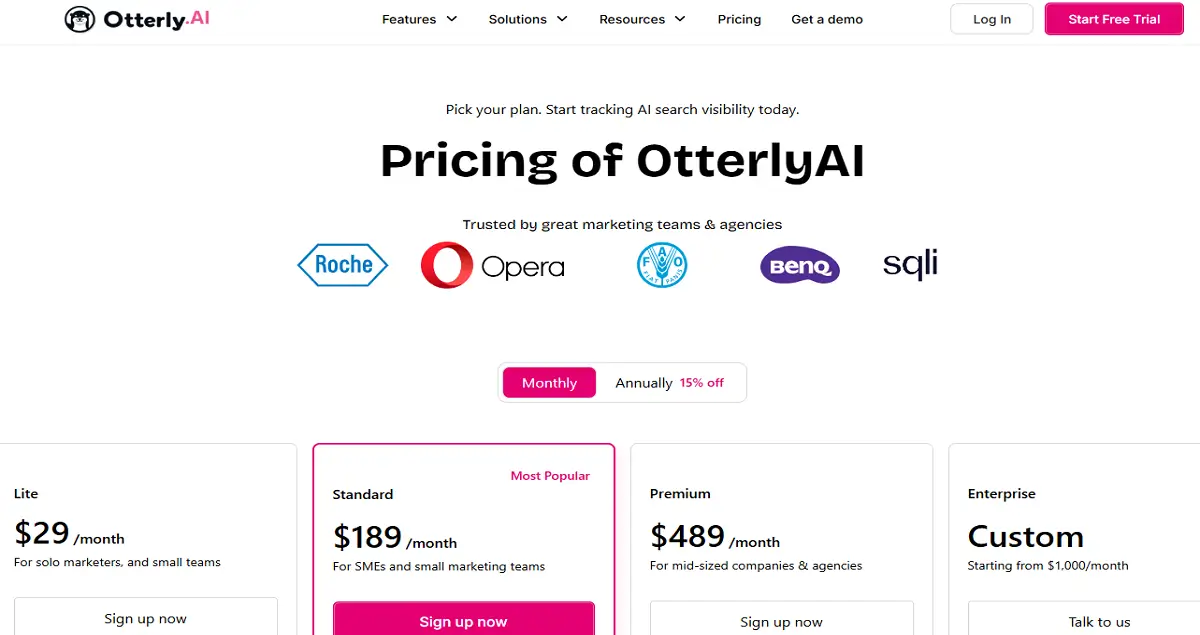
Otterly.ai starts at $29 a month ($25 a month billed yearly) and is built for solo marketers and small teams. Setup takes minutes. The Lite plan checks ChatGPT, Google AI Overviews, Perplexity, and Microsoft Copilot every day. Google AI Mode, Gemini, and Claude cost extra as add-ons. On Lite, AI Mode and Gemini are $9 a month each, and Claude is $29. Add all three, and you’re at about $76 a month for seven platforms.
There’s one limit to know about. Lite tracks 15 prompts. That’s plenty for one small site, but it fills up fast. Otterly also won’t give you the deepest data on the market. For a blogger or single-site affiliate, though, clear and fast beats deep and complicated.
Here’s what its main features do, and which plan you need:
- Prompt Research: Finds the questions people ask ChatGPT and other AI platforms in your niche. You start with a keyword, a brand name, or a URL, so you’re not guessing what to track. (Included in Lite.)
- AI Search Analytics: Shows when your brand is mentioned, when it isn’t, and how you compare with competitors. It also tracks which pages get cited. (Included in Lite.)
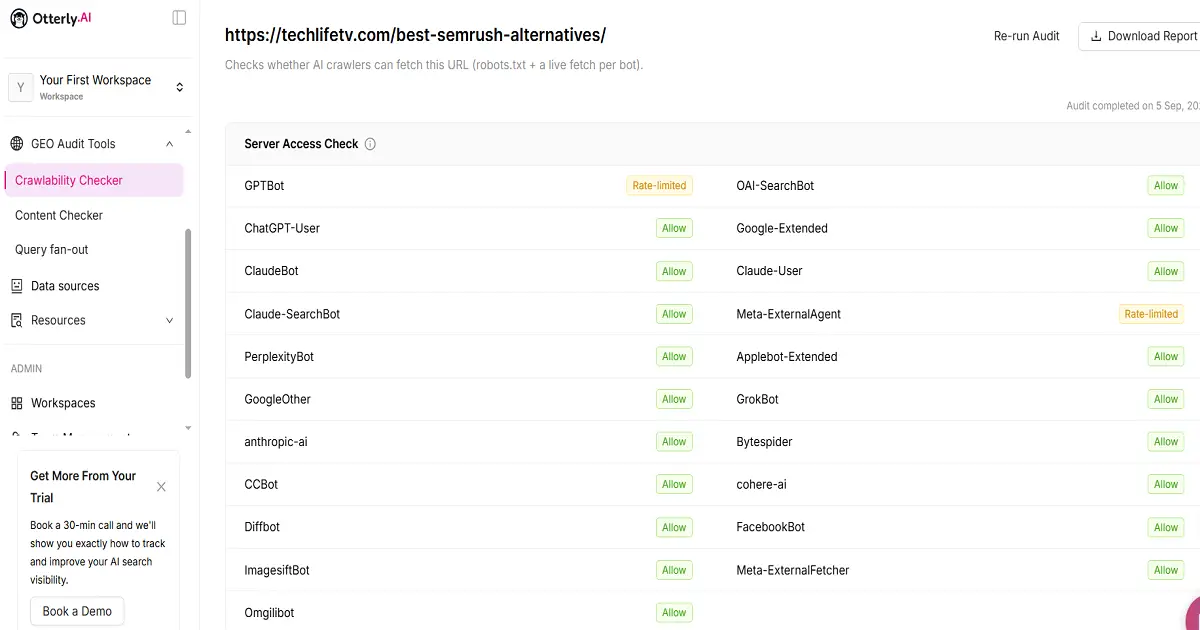
- AI Search Optimization: Checks whether AI bots can crawl your pages, audits your content, and suggests what to fix. Lite gives you 3 recommendations a week. Standard and above give you unlimited. (Included in Lite.)
- ChatGPT Ads Tracking: Shows whether ads or shopping cards appear in ChatGPT answers, yours or your competitors’. (Included in Lite.)
- Agent Analytics: Shows which AI bots and agents visit your site, such as OAI-SearchBot, ChatGPT-User, and PerplexityBot, plus the visitors they send you. It needs a lightweight setup at your server, edge, or CDN level. (Standard plan and above.)
- MCP: Lets an AI assistant like Claude or ChatGPT answer questions about your Otterly data directly. (Standard plan and above.)
- API: Lets you pull your brand reports, prompts, and citations into your own tools or dashboards. (Standard plan and above.)
For most solo sites, the first three features do the real work. MCP, the API, and Agent Analytics start on the $189 Standard plan, so they make more sense for agencies and bigger teams.
Frase is a content tool with AI visibility built in. It helps you plan, write, and score your content, including briefs and outlines based on what already ranks. The Starter plan is $49 a month, or $39 a month billed yearly. You get 1 seat and 1 site, 10 articles and 50 audit pages a month, and SEO and GEO scores. It can publish straight to WordPress, Webflow, Sanity, or Wix. If you already write your own content, one subscription covers two jobs.
Here’s the catch. On Starter, AI visibility tracking covers ChatGPT and Google AI only. Perplexity comes with the Professional plan ($129 a month). Claude and Gemini come with the Scale plan ($299 a month). Here is Frase’s official pricing page
Frase’s agent can also publish on its own if you turn that on. I’d keep a human in the loop. Let it draft, then read and edit everything before it goes live. AI drafts can miss facts, and they rarely sound like you.
Mid-range: worth it once your site earns money
SE Visible is SE Ranking’s standalone AI visibility product, and it’s the best deal here for prompt volume. Basic is $99 a month and includes 200 prompts, about 30,000 AI answers analyzed each month, and 3 projects. It tracks ChatGPT, Gemini, AI Mode, Perplexity, and Google AI Overviews. Core is $189 (450 prompts, 5 projects) and is $355 (1,000 prompts, 10 projects). Yearly billing saves 20%.
It includes AI source tracking, prompt research, competitor analysis, and a brand visibility dashboard. Query fan-out analysis, local AI visibility, and sentiment tracking are listed as “coming soon.” It doesn’t list Claude or Copilot. Are you curious about SE Ranking’s own affiliate program? You may join there for a 30% recurring commission.
Semrush AI Visibility Toolkit costs $99 a month per domain. You get 25 custom prompts with daily tracking, plus brand performance analysis for one domain. It covers ChatGPT, Google AI, Gemini, and Perplexity, and it adds competitor analysis, prompt research, and a site audit for AI readiness. It makes the most sense if you already pay for Semrush, because you get more from a subscription you already have. On its own, 25 prompts for $99 is thin compared with SE Visible. If Semrush doesn’t fit your budget, see our Semrush alternatives guide.
Peec AI starts at $95 a month. Starter includes 50 prompts, daily tracking, unlimited users, and 1 project. You choose 3 AI models to track, which is handy if you know your audience only uses a few. Pro is $245 (150 prompts, 2 projects). Advanced is $495 (350 prompts, 5 projects, multi-country tracking, and a Looker Studio integration). Enterprise adds API access, SSO, and up to 13 models.
All-in-one: tracking plus content and SEO agents
Sedestral goes beyond tracking. Pro is $144 a month (20% off if you pay yearly) and covers 2 sites or languages and 2 users. Each month you get 30 AI tracking checks, 15 monitored competitors, 20 blog articles, 50 page optimizations, and 10 SEO audits. The max is $288 and covers 6 sites and 4 users. It’s a fair pick if you want one tool to track, write, and optimize. If you only want tracking, it costs more than you need.
Quick Comparison Tables
Price and limits
| Tool | Best for | Starting price* | Prompts included | Sites or brands |
| Otterly.ai | Solo bloggers, tight budgets | $29/mo Lite ($25 yearly) | 15 | 1 workspace (unlimited on Standard, $189) |
| Frase | Content plus tracking | $49/mo Starter ($39 yearly) | Not listed | 1 site (5 on Professional, $129) |
| SE Visible | Most prompts per dollar | $99/mo Basic | 200 | 3 projects |
| Semrush AI Toolkit | Existing Semrush users | $99/mo per domain | 25 | 1 domain per plan |
| Peec AI | Choosing your own models | $95/mo Starter | 50 | 1 project (2 on Pro, $245) |
| Sedestral | Tracking plus content agents | $144/mo Pro | 30 AI tracking checks | 2 sites or languages |
*Monthly billing. Yearly plans are cheaper. Confirm on each vendor’s pricing page. Last checked: September 2026.
AI platforms tracked on the entry plan
| Tool | ChatGPT | Google AI (Overviews / AI Mode) | Gemini | Perplexity | Claude | Copilot |
| Otterly.ai Lite | Yes | Overviews: yes. AI Mode: +$9 | +$9 | Yes | +$29 | Yes |
| Frase Starter | Yes | Yes (“Google AI”) | Scale plan | Professional plan | Scale plan | Not listed |
| SE Visible Basic | Yes | Yes (both) | Yes | Yes | Not listed | Not listed |
| Semrush Base | Yes | Yes (“Google AI”) | Yes | Yes | Not listed | Not listed |
| Peec AI Starter | Pick any 3 models | Pick any 3 models | Pick any 3 models | Pick any 3 models | Pick any 3 models | Pick any 3 models |
| Sedestral Pro | Check vendor | Check vendor | Check vendor | Check vendor | Check vendor | Check vendor |
A quick value check. Divide price by prompts, and you get a rough cost per prompt. SE Visible Basic is about $0.50. Peec Starter is about $1.90, and Otterly Lite is about $1.93. Semrush Base is about $3.96. This is only a guide, because the tools count and run prompts a little differently. But the gap is big enough to matter.
Competitor Tracking and Brand Monitoring
These two jobs sound alike, but they answer different questions.
Competitor tracking tells you who AI recommends instead of you. The key number is share of voice: how often you appear compared with your top two or three rivals for the same prompts. Otterly.ai benchmarks your brand against competitors in its Brand Report. Semrush has AI competitor analysis, SE Visible has competitor analysis built for AI answers, and Sedestral’s Pro plan monitors 15 competitors.
Start small. Track three competitors, not ten. More names just add noise.
Brand monitoring tells you what AI says about you. A wrong price, an outdated feature, or a mixed-up comparison can cost you trust before anyone clicks. Otterly.ai offers brand sentiment analysis, and Semrush includes brand performance analysis for one domain. SE Visible lists sentiment tracking as “coming soon,” so don’t buy it for that yet. Whatever tool you pick, review new mentions once a month and fix wrong facts on your site right away.
Where Can I Get a Package That Includes AI Search Visibility and Share of Voice Optimization?
You can get a package with both from Otterly.ai, SE Visible, Semrush, or Sedestral. Each one tracks your AI visibility and compares you with competitors. For most solo bloggers, Otterly.ai at $29 a month is the easiest place to start.
Here’s why this matters. AI search visibility tells you if AI mentions you. Share of voice tells you how often you show up compared with your top rivals for the same questions. You need both numbers to see the full picture. A tool that shows only one leaves you guessing.
A good package should do three things:
- Track your mentions and citations across AI platforms like ChatGPT, Google AI Overviews, and Perplexity.
- Compare you with competitors so you can see your share of voice.
- Show you what to fix, so the numbers lead to action.
Here’s how the main options stack up:
| Package | Best for | Starting price | Share of voice support |
|---|---|---|---|
| Otterly.ai | Solo bloggers, small budgets | $29/mo | Brand Report benchmarks you against competitors |
| SE Visible | Most prompts for the money | $99/mo | Competitor analysis built for AI answers |
| Semrush AI Visibility Toolkit | Existing Semrush users | $99/mo per domain | AI competitor analysis |
| Sedestral | Tracking plus content agents | $144/mo | Monitors 15 competitors on Pro |
If you want the lowest entry cost, pick Otterly.ai. Its Lite plan checks ChatGPT, Google AI Overviews, Perplexity, and Microsoft Copilot daily. It also gives you three fix recommendations each week. That’s a nice bonus, because share of voice only improves when you act on what you learn.
If you need more volume, SE Visible gives you 200 prompts on its $99 Basic plan. That’s the best prompt count at this price in my comparison.
A quick tip: Start with three competitors, not ten. Too many names make your share of voice data noisy and hard to read.
Pricing changes often in this space, so confirm the current rate on each vendor’s page before you subscribe.
AI Search Visibility Tools With AI-Powered Recommendations
Some tools only report numbers. Others tell you what to change. Here’s the difference:
- Otterly.ai: Crawlability checks, content audits, and recommendations. Lite gets 3 recommendations a week.
- Frase: SEO and GEO scores, plus an agent that can draft and publish content.
- Semrush: A site audit that checks how ready your pages are for AI. If you’re also looking for free Semrush alternatives for keyword research, site audits, and other SEO tasks, check out our guide to Semrush Free Alternatives.
- Sedestral: Blog and optimization agents that write and improve pages for you.
- SE Visible: Shows which sources AI cites and helps with prompt research, but it doesn’t list built-in fix recommendations.
If you’re a solo site owner with limited time, pick a tool that tells you what to do next.
Managing Multiple Domains and Client Sites
If you’re a small agency, five separate subscriptions can turn your margin into a rounding error. Here’s how each tool handles a centralized AI search visibility dashboard for multiple domains:
- Otterly.ai: Lite includes 1 workspace. Standard ($189) gives you unlimited workspaces. Agency Partner status, which adds extra prompts and white-label-style reporting, requires a Standard or Premium plan first.
- SE Visible: 3 projects on Basic ($99), 5 on Core ($189), and 10 on Plus ($355). This is the cheapest way to cover several sites.
- Frase: Professional ($129) covers 5 sites. Scale ($299) covers up to 10 domains and adds client-ready reports.
- Peec AI: Pro has 2 projects, and Advanced has 5. Its agency plans run $245 (Essential), $495 (Growth, for 3 to 10 clients), and $795 (Scale, for 11 to 25+ clients).
- Semrush: $99 per domain, so three sites cost about $297 a month. For more details: Best Semrush alternative for AI search visibility
- Sedestral: Max covers 6 sites for $288. The Agency plan is $721 for 20 client sites with white-label reporting.
Tools with “book a demo” instead of a price are usually overkill when you’re keeping five to fifteen client sites visible.
Search Management Platform
A search management platform is one place where you track, fix, and measure your search visibility. The best ones cover both Google and AI answers, so you don’t juggle five different dashboards.
Think of it as a control room for your content. Instead of checking rankings in one tool and AI mentions in another, you see everything together. That saves time, and it makes it easier to spot gaps.
Here’s what to look for:
- Tracking and fixing in one place. Seeing a problem is only half the job.
- Content tools built in. Some platforms help you plan, write, and score pages, too.
- Clear limits. Check prompts, sites, and platforms before you pay.
For example, Frase mixes content writing with AI visibility tracking. Its Starter plan is $49 a month and includes SEO and GEO scores. It can also publish straight to WordPress. If you want tracking plus writing agents, Sedestral is another all-in-one option. And if you already pay for Semrush, its AI Visibility Toolkit adds a site audit that checks how ready your pages are for AI.
One honest note: an all-in-one platform costs more than a tracking-only tool. If you only need to watch your numbers, skip the extras.
Tools for Content-Heavy Sites
If your site has hundreds of posts, tracking your brand name isn’t enough. Here’s what helps:
- Check crawl access first. If GPTBot or PerplexityBot can’t reach your pages, AI can’t cite them. Otterly’s crawlability checker shows which AI bots can get in.
- Track at the page level. Source tracking shows which pages AI actually pulls from. Build more pages like those.
- Start with your top 20 pages. Pick the ones that earn the most traffic or revenue. Don’t try to fix 500 pages at once.
- Use audit limits wisely. Frase gives you 50 audit pages a month on Starter, 250 on Professional, and 1,000 on Scale. Its Content Guard watches 10, 75, or 300 pages for Google traffic decay.
- Watch AI bot visits. Frase adds AI crawler monitoring on Professional, and Otterly’s Agent Analytics does something similar on Standard.
- Refresh facts on a schedule. Old prices and feature lists confuse AI. A quarterly fact-check on key pages keeps you from being cited incorrectly.
How to Use AI Tools for Search Visibility Management, Step by Step
Buying the tool is the easy part. Here’s a simple way to use it:
- Write 10 to 15 prompts. Base them on real questions from your readers, emails, comments, and forums. Mix “best X for Y,” “X vs Y,” and “how to” questions. (That fits Otterly’s Lite limit. Larger plans allow more.)
- Start a free trial. It gives you a quick snapshot before you spend money.
- Add your prompts. Add two or three competitors too.
- Save a baseline. Note your citation count, share of voice, sentiment, and cited pages. Take a screenshot.
- Pick your three biggest gaps. These are prompts where competitors show up, and you don’t.
- Fix those pages. Rewrite the opening, clarify your entities, and add a short FAQ.
- Check again in two to four weeks. AI answers change from run to run, so judge the trend, not one result.
The Metrics That Actually Tell You Something
Skip the jargon. These five numbers matter:
- Citation frequency: how often AI mentions you for questions in your niche. Watch the trend, not one snapshot.
- Share of voice: how you compare with your top three competitors on the same questions.
- Sentiment: whether AI describes you accurately and positively.
- Source attribution: which of your pages AI pulls from.
- Trend direction: whether you’re climbing, flat, or slipping. Three months of movement beats one good week.
You don’t need to check all five daily. Look at citation frequency and share of voice weekly. Review sentiment and source pages monthly. For a deeper breakdown, see our tracker vs. analysis guide.
How to Grow Your Organic Reach and Get Cited
Tracking shows where you stand. These habits move the needle, and they help both Google and AI:
Write answer-first. AI tends to pull the paragraph that answers a question most directly. Put your clearest answer in the first two or three sentences of every section, then explain.
Make your entities clear. Say what you are, plainly and consistently: your brand name, niche, and product category. If you review budget laptops for students, say exactly that, more than once.
Structure content in clear chunks. Clear headings, short paragraphs, and FAQ sections help AI platforms that split a big question into smaller ones (often called query fan-out). Otterly’s free Query Fan Out tool shows you the extra questions AI may ask behind one prompt.
Get mentioned on other sites. AI leans on what trusted sources say about you: comparison articles, review sites, and real community discussions. Add useful answers there instead of dropping a link. One honest mention on a trusted page can help more than another post on your own site.
Keep facts current. Outdated pricing or conflicting details across pages hurt how accurately AI describes you.
Add schema where it fits. FAQ and product schema give crawlers a clean version of your content. It won’t guarantee a citation, but it costs almost nothing.
None of this needs a developer. About an hour a week, done steadily, beats one big push you never repeat.
How to Improve Search Visibility and Click-Throughs From AI
You’ll want to know if AI visibility brings visitors. Here’s how to check, and where the picture gets fuzzy:
- Google Analytics 4: look at referral traffic from chatgpt.com, perplexity.ai, claude.ai, and similar sources.
- Search Console: watch impressions and clicks on the pages you’ve been improving.
- A simple form question: add “How did you find us?” to your contact or signup form, with AI as an option.
- Otterly’s free AI referral traffic tool: a quick way to see AI visits. Paid plans add Agent Analytics for bot activity.
Here’s the honest part. AI traffic is usually undercounted. Many AI answers don’t include a link, and many people see a recommendation, then Google the brand or type the URL. Those visits show up as organic or direct traffic. So treat AI referral numbers as a floor, not the full story.
To earn more clicks, make your page worth the visit. Give the direct answer up top, then add something the AI summary can’t: your own test results, screenshots, and a clear next step.
A Simple Weekly Routine
Here’s a routine that takes under two hours a week:
- Monday: Check citation frequency and share of voice. Note anything that dropped.
- Tuesday: Pick one page that lost visibility and rewrite its opening two sentences to answer the core question.
- Wednesday: Spend 20 minutes finding one relevant discussion or comparison post where you can add a truly useful answer.
- Thursday: Add or fix FAQ schema on one page.
- Friday: Review sentiment on new citations. Fix anything wrong right away.
Small, repeatable, and it adds up.
Common Mistakes to Avoid
Trusting a “best tool” list written by the tool itself. Many comparison articles rank their own product first. That’s not always dishonest, but it isn’t neutral. Cross-check any recommendation, including mine, with a couple of independent reviews before you pay for a year.
Paying for platforms you don’t need. If your readers use ChatGPT and Google AI Overviews, don’t upgrade just to track Grok or DeepSeek.
Ignoring prompt limits. A cheap plan with 15 prompts can run out fast. Count your prompts before you buy.
Treating the dashboard as the finish line. A tool shows what’s broken. It doesn’t fix your content. Set aside real time each week to act on it.
Ignoring sentiment. Being cited with the wrong price can be worse than not being cited at all.
Switching tools every month. Data needs a few weeks to show a trend. Give a tool at least a month before you judge it.
Frequently Asked Questions
What are the best AI tools to manage search visibility across channels?
For a solo blogger or one site, Otterly.ai ($29 a month) and Frase ($49 a month) are the best starting points. Need more prompts? SE Visible starts at $99 and includes 200. If you already pay for Semrush, its AI Visibility Toolkit is an easy add-on.
What are some Otterly AI alternatives for tracking AI visibility?
Popular Otterly AI alternatives include SE Visible, Peec AI, Semrush AI Visibility Toolkit, Profound, Promptwatch, Frase.io, and AthenaHQ. For solo bloggers and tight budgets, focus on affordable tools with simple dashboards and essential AI-channel tracking. Peec AI and SE Visible may suit users seeking straightforward tracking, while Profound is geared toward larger teams. Compare pricing, channels, features, and ease of use.
Which tools track Claude, ChatGPT, Perplexity, and Google AI Overviews?
Otterly.ai tracks ChatGPT, Perplexity, and Google AI Overviews on Lite, and adds Claude for $29 a month extra. Frase tracks Claude on its Scale plan. SE Visible and Semrush cover ChatGPT, Perplexity, and Google’s AI, but they don’t list Claude. With Peec AI, you pick the models you want to track.
What does an AI search visibility management tool do?
It checks whether AI platforms mention your brand, how they describe you, which competitors they name instead, and which of your pages they cite. The better tools also suggest what to fix.
How do I use these tools?
Write 10 to 15 real questions, add them with two or three competitors, save a baseline, fix your three biggest gaps, then check again in two to four weeks.
Can I track competitors and monitor my brand?
Yes. Otterly.ai, Semrush, SE Visible, and Sedestral all offer competitor tracking. Start with three competitors so the data stays easy to read.
Do I need a special tool for multiple domains?
Not always, but check the limits before you buy. SE Visible gives you 3 projects at $99, and Semrush charges $99 for each domain. Otterly.ai’s Standard plan ($189) adds unlimited workspaces.
Can these tools show whether AI sends me clicks?
Only partly. Use them with Google Analytics 4 and Search Console, and ask new customers how they found you. AI traffic is usually undercounted.
Are free trials enough?
They’re great for a first snapshot. Once you need regular tracking, competitor data, or trend lines, a paid plan makes sense.
Which package includes both AI search visibility and share of voice tracking?
Otterly.ai, SE Visible, Semrush, and Sedestral all include both. Otterly.ai is the cheapest at $29 a month, and its Brand Report compares you with competitors. SE Visible starts at $99 and gives you 200 prompts.
What is share of voice in AI search?
Share of voice shows how often AI mentions your brand compared with your top rivals for the same questions. If AI names you in three out of ten answers, and a competitor in six, they hold the bigger share. Watch this number weekly, along with your citation count.
What is a search management platform?
It’s one tool where you track, fix, and measure your visibility in Google and AI answers. Instead of using several dashboards, you see everything in one place. Frase, Sedestral, and the Semrush AI Visibility Toolkit are good examples.
The Bottom Line
AI search visibility management tools aren’t just for big agencies anymore. They’re becoming as basic as checking Google Analytics. You don’t need the priciest platform. Pick a tool that fits where you are, watch two or three numbers each week, and fix your content one page at a time.
I compare what these tools actually deliver before I recommend them, even when that means earning a smaller commission. Start a free trial this week, choose one tool from the budget tiers above, and give the weekly routine a month before you judge it. If you’re building affiliate income around SEO tools, see our full list. See our full list.