
Best SEO Tools for Small Businesses: Simple, Affordable Software for 2026

By Md. Khalilur Rahman | Last updated: October 03, 2026 | Prices last checked: October 03, 2026
Disclosure: Some links below are affiliate links. If you buy through them, TechLifeTV may earn a commission at no extra cost to you. We only recommend tools we would point a friend toward, and every tool below lists its weak spots too.
If you run a small business, you’ve probably been here. You search for SEO software, and every list shows the same giant platforms with price tags that look like a second rent payment. You sign up for one, open the dashboard, and stare at forty reports you don’t understand. A month later, you stop logging in.
That isn’t a you problem. Most SEO software is built for agencies and big brands, not for an owner with a few spare hours a week.
Here’s the good news. You don’t need much. A small set of simple, affordable SEO tools can cover almost everything a small business needs: finding keywords, planning content, fixing technical issues, and tracking results. Some of the best ones are completely free.
Over the last three years, I’ve worked with dozens of SEO platforms on content sites, local businesses, and affiliate projects. One pattern kept showing up. The businesses that make progress aren’t the ones with the biggest tool stack. They’re the ones that pick a few tools and use them every single week.
This guide walks you through 23 tools, grouped by the job each one does. You’ll see what each costs, who it fits, and where it falls short. By the end, you’ll know which cost-effective SEO software fits your budget and SEO workflow, and which tools you can safely skip for now.
Best SEO Tools for Small Businesses: The Quick Answer
Short answer: Start with the free basics: Google Search Console, Google Analytics 4, and Rank Math if you use WordPress. Add KeySearch (about $24/month) for keyword research. Then add Frase and SE Ranking only when you’re ready to publish and track consistently.
Here’s the fast version, so you can see where you fit before reading the details.
| What You Need | Best Tool | Why It Fits |
| Free foundation | Google Search Console | Direct Google data, no guessing |
| Budget SEO | KeySearch | Solid keyword research at a low monthly price |
| Easiest start | Ubersuggest | Plain-English reports for first-timers |
| AI content planning | Frase | SERP-based briefs, AI writer, SEO and GEO scores, plus AI visibility tracking in one workspace |
| Technical SEO | Screaming Frog | Finds broken links and crawl issues |
| Local SEO | BrightLocal | Built for citations, reviews, and local rankings |
| All-in-one (most complete) | Semrush | Most complete platform, but not the cheapest |
| All-in-one (with AI visibility) | SE Ranking | Rank tracking, audits, competitor research, and AI visibility tracking in other plans |
Table of Contents
How I Chose These Tools (And What They Really Cost)
Before we dig in, you should know how these picks were made. A “best of” list is only useful if you can trust it.
I judged every tool on five questions:
- Ease of use: Could a non-expert get value in the first week?
- Cost-effectiveness: Is the price fair for a small website?
- Real impact: Does it improve rankings or save meaningful time?
- Honest weaknesses: What will annoy you, or limit you?
- Upgrade path: Can it grow with your business?
I only call a tool “best” when I can tell you who it’s for and where it falls short. That’s why every tool below includes a “Best for” line and a “Heads-up” line.
One more thing. Prices change often. The numbers in this guide are approximate monthly prices at the time of writing. Paying yearly usually saves about 15% to 25%, so the monthly prices here are the higher number. Check the vendor’s pricing page before you buy.
Quick Comparison: Best SEO Software for Small Businesses in 2026
Use this table to spot the right tool for your situation before you read the full reviews.
| Tool | Category | Best For | Starting Price | Biggest Strength | Biggest Weakness |
| Google Search Console | Free foundation | Every website | Free | Direct Google data | Reports lag by a couple of days |
| Google Analytics 4 | Free foundation | Tying traffic to revenue | Free | Connects SEO to business results | Steep learning curve |
| Rank Math | On-page (WordPress) | WordPress SEO setup | Free | Deep features for a free plugin | WordPress only |
| Screaming Frog | Technical SEO | Site audits | Free (500 URLs) | Finds hidden technical issues | Desktop app, some skill needed |
| Google Business Profile | Local SEO | Every local business | Free | Direct influence on map results | Needs regular updates |
| AlsoAsked | Intent research | Related questions | ~$15+tax | Shows follow-up questions | No volume data |
| AnswerThePublic | Keyword ideas | Question-based content | Free/ ~$10 | Real questions people ask | Limited free searches |
| KeySearch | Budget keyword research | Low-cost keyword research | ~$24 | Great value | Smaller data index |
| Whitespark | Local SEO | Citation clean-up | ~$33 | Strong citation audits | Narrow focus |
| BrightLocal | Local SEO | Citations and reviews | ~$41 | Purpose-built for local | Limited use outside local |
| Frase | AI SEO / research | SERP briefs and outlines | ~$49 | Research and writing in one place | AI drafts need editing |
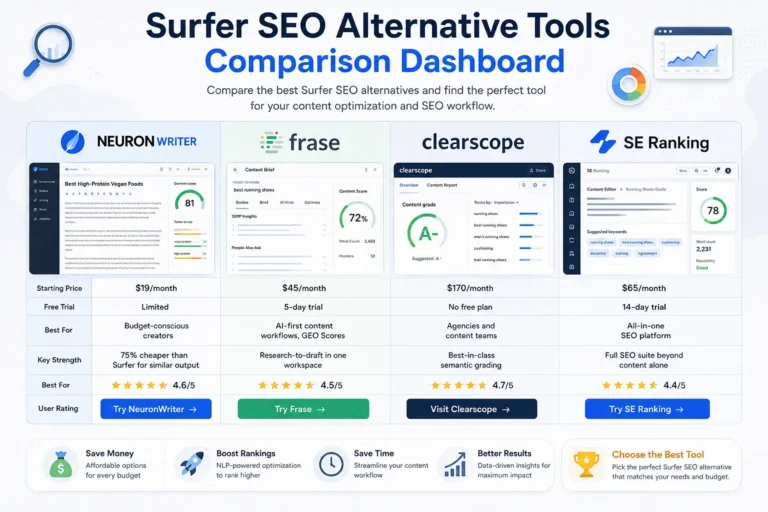
| Surfer SEO | AI SEO / on-page | Content optimization | ~$59 | Real-time scoring | AI tracking costs more |
| SE Ranking | Rank tracking | Local and national tracking | ~$129 | Many tools in one dashboard | Higher price, no lower tier |
| Ahrefs | Competitor research | Backlinks and gaps | ~$129 | Strong backlink database | Pricey; free plan covers only your own site |
| Clearscope | AI SEO / content | Topic depth | ~$129 | Strong relevance grading | Costly for small teams |
| Semrush | All-in-one | Keyword research and tracking | ~$139 | Most complete platform | Overwhelming for beginners |
Affordable SEO Software: Where a Small Budget Works Hardest
Short answer: The best cheap SEO software is the one you’ll open every week. A $24 tool you use consistently beats a $200 platform collecting dust in a browser tab.
So don’t judge affordable SEO software by sticker price alone. Judge it by return per dollar. Here are the four tools that, in my view, give small businesses the most for the least.
Rank Math (free) is the easiest place to start if your site runs on WordPress. It handles on-page optimization, schema markup, sitemaps, and basic rank tracking, all without code. For many owners, it replaces a separate on-page audit tool right away.
KeySearch (about $24 a month) is one of the most underrated cheap SEO tools for small businesses. It helps you find low-competition keywords without a premium-suite budget. The data index is smaller than the big platforms, but for finding rankable topics, it does the job.
Frase (about $49 a month) cuts the research grind. Instead of opening ten tabs to see what competitors cover, you get a structured brief built from the top results. If you publish even a few articles each month, that time savings adds up.
SE Ranking (about $129 a month) puts rank tracking, site audits, competitor analysis, and AI visibility tracking in one dashboard. It costs more than the other three, so treat it as the step you take once you’re publishing regularly and want everything in one place.
Put those four together, and you get a full workflow for about $202 a month. That covers keyword discovery, content planning, on-page SEO, and rank tracking with AI visibility. You don’t have to buy it all at once, though. Start smaller and add tools as you grow:
| Budget | What to Use | Monthly Cost |
| Zero budget | Search Console, GA4, Rank Math, Screaming Frog (free), Keyword Planner | $0 |
| Low-cost starter | Add KeySearch | About $24 |
| Content planning | Add Frase (Starter) | About $73 |
| Full stack with tracking | Add SE Ranking | About $202 |
| Growth stack | Add Surfer SEO plus Ahrefs or Semrush | About $390 and up |
Most small businesses don’t need the growth stack yet. Earn your way up to it.
Which SEO Software Offers the Best Value for Money on a Limited Budget?
Short answer: KeySearch is our pick for the best value for money. At about $24 a month, it gives you keyword research, SERP analysis, and competitor insights without the price tag of a premium suite. Pair it with free tools like Google Search Console and Rank Math, and you have a strong, low-cost foundation.
“Value” doesn’t just mean the lowest price. It means how much useful work a tool does for every dollar you spend. A cheap tool you never open is poor value. A fairly priced tool you use every week is great value.
Here’s why KeySearch earns the top spot for businesses on a tight budget:
- It targets the first big problem. Most small sites struggle because they chase keywords they can’t win. KeySearch helps you find terms you actually have a shot at.
- It’s easy to learn. The dashboard is clean and beginner-friendly, so you’ll use it instead of avoiding it.
- The price is easy to justify. You can start for about $24 a month, and it also covers YouTube keyword research.
It isn’t perfect. The data index is smaller than the big platforms, backlink data is limited, and site audits are basic. For finding rankable topics on a budget, though, those trade-offs are easy to live with.
Once your budget grows, here’s the natural next step:
| If Your Priority Is | Best Value Pick | Approx. Cost |
| Spending nothing | Search Console + Rank Math | Free |
| Finding keywords you can win | KeySearch (our value pick) | ~$24/month |
| Planning content faster | Frase | ~$49/month |
| Tracking and audits in one tool | SE Ranking | ~$129/month |
Skip the big platforms for now unless you’re publishing regularly. Ahrefs and Semrush are powerful, but they cost much more, and most limited-budget businesses won’t use enough of their features to justify it yet. Try KeySearch
Enterprise SEO Tools vs. Small Business Solutions
Enterprise SEO platforms are made for thousands of pages, multi-country keyword sets, and reporting across big teams. For a local bakery or a two-person law firm, that depth isn’t power. It’s noise. And the wrong SEO software can actually make a small team slower, not faster.
Think about how a small business really works. You’re making decisions between customer calls and invoices. You need tools that skip the guesswork, fit a real budget, and deliver clear next steps. You don’t need a dashboard built for a 40-person marketing department.
That’s why the best SEO software for small businesses follows the 80/20 rule. A small number of habits drive most of your results: targeting realistic keywords, keeping your Google Business Profile current (if you’re local), and getting basic on-page SEO right. Tools should support those habits, not bury them.
How to Choose the Right SEO Software for Your Business
Before you spend a dollar on any platform, answer these four questions. They cut through marketing claims and show what you need right now.
| Question | Your Answer | Where to Start |
| What’s your real bottleneck? | No traffic | Keyword research tools |
| Traffic but poor rankings | Content optimization tools | |
| Weak local visibility | Local SEO tools | |
| Crawl or speed problems | Site auditing tools | |
| How much time do you have? | Under 3 hours a week | Simple tools with automation |
| Do you need an all-in-one? | You only use the basics | Skip it for now, and save money |
| Can it scale with you? | You expect growth | Pick tools with clear upgrade paths |
The smartest approach? Start with one solid tool. Add a specialized one only when you hit a clear ceiling. That’s what “scalable SEO software” really means: a tool with a sensible next step, not a tool that does everything on day one.
A tool you use at 60% of its potential every week will beat a tool you use sporadically at 100%.
The Zero-Waste SEO System: 23 Tools for Small Businesses (Free and Paid)
Most small businesses don’t fail at SEO because they lack tools. They struggle because their tools, advice, and workflows don’t fit together.
So here’s a simple system. Every tool has one purpose, a clear payoff, and a place in a repeatable routine:
Discovery → Intent → Content → Optimization → Competition → Technical → Local → Automation → Data Loop
Fewer tools. Better decisions. A system that compounds.
Layer 1: Discovery (Find Keywords You Can Actually Rank For)
Most small businesses waste months targeting keywords they were never going to win. Start with low-competition, high-intent terms instead.
1. LowFruits: LowFruits hunts for weak spots in the search results. It flags keywords where forums, old pages, or low-authority sites are ranking, which signals that a smaller site has a shot. Try LowFruits
Best for: easy-win, long-tail keywords. Heads-up: it’s pay-as-you-go, and credits can add up if you run big lists. It’s also not an all-in-one platform.
2. KeySearch: KeySearch gives you keyword research, SERP analysis, and competitor insights in a clean, beginner-friendly dashboard. It even includes YouTube keyword research, with plans starting at about $24 a month. Try KeySearch. Best for: affordable keyword research. Heads-up: the data index is smaller than premium suites, backlink data is limited, and audits are basic.
3. Ubersuggest. Ubersuggest is one of the gentler places to start. It explains metrics in plain English and groups keywords by difficulty. Best for: zero-budget or first-time SEO research. Heads-up: it isn’t as deep or accurate as Ahrefs or Semrush, so treat it as a starter tool.
4. Google Keyword Planner: This free tool gives you search volume and cost-per-click data straight from Google. High CPC often hints at strong commercial intent. Best for: validating keywords on a zero budget. Heads-up: volume comes in broad ranges, and it isn’t built for SEO.
5. Google Trends: Google Trends shows whether interest in a topic is rising, falling, or seasonal. Best for: timing your content. Heads-up: it shows relative interest, not exact volume, so pair it with a keyword tool.
What you leave with: a realistic keyword list with manageable competition and clear intent.
Layer 2: Intent Mapping (Understand What People Really Want)
Ranking means little if your page doesn’t match what the searcher is trying to do. This layer turns keywords into content people actually want.
6. AnswerThePublic: It shows real questions people type into search, which makes it great for H2s, H3s, and FAQ ideas. The free plan is limited, and paid plans start at about $10 a month. Best for: question-based content ideas. Heads-up: no keyword difficulty data.
7. AlsoAsked: AlsoAsked turns Google’s “People Also Ask” boxes into question trees, so you see which follow-up questions come next. Paid plans start at about $15/month. Best for: building complete, intent-aware articles. Heads-up: limited free tier and no volume data.
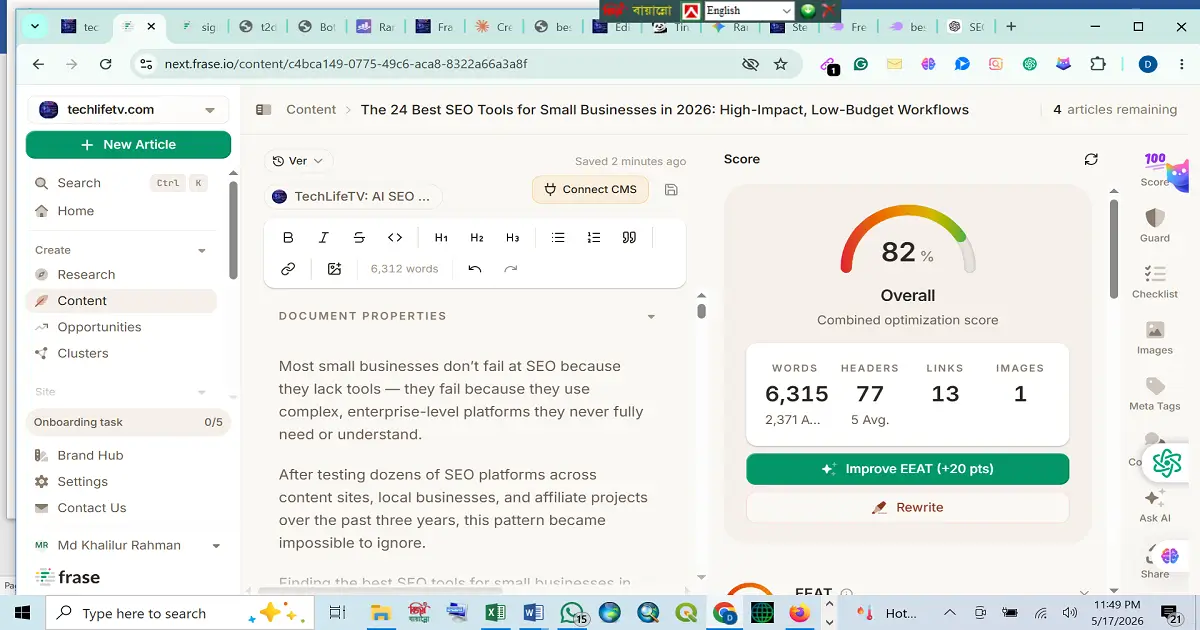
8. Frase: Frase builds SERP-based content briefs from top-ranking pages, so you can plan your outline before you write a word. It also includes an AI writer and content optimization, with both SEO and GEO scores. Plans start at $49 a month for Starter, which already includes AI visibility tracking for ChatGPT and Google AI. The Professional plan (about $129 a month) adds Perplexity, and the Scale plan (about $299 a month) adds Claude and Gemini on top of that. If you publish often, it can save hours of competitor research and tab-switching. Try Frase.
Best for: SERP briefs, SEO-focused outlines, and content optimization in one workspace. Heads-up: it costs more than entry-level tools, and the AI output needs a human edit.
What you leave with: a clear content angle tied to real search intent.
Layer 3: Content Creation (Build Better Drafts Faster)
The goal here isn’t to replace your voice. It’s to solve the blank-page problem.
9. ChatGPT or Claude AI assistants are handy for clustering keywords, outlining articles, and drafting FAQs. Both have free options. Best for: speeding up repetitive writing tasks. Heads-up: always fact-check, and always edit. Raw AI text is usually generic, and these tools can’t run real SERP research. Try ChatGPT or Cluade
10. Surfer SEO: Surfer’s Content Editor scores your draft in real time as you write, based on pages already ranking. Best for: guided, step-by-step on-page optimization (plans start at about $59 a month, or about $49 if you pay yearly). Heads-up: the entry plan is limited, plans with AI visibility tracking cost more, and chasing a perfect score can lead to over-optimized, stiff writing.
11. Clearscope: Clearscope focuses on topical relevance and semantic coverage instead of keyword stuffing (Essentials plan, about $129 a month). Best for: businesses publishing content regularly. Heads-up: it’s expensive and makes more sense for sites with lots of content.
What you leave with: an optimized draft that’s ready for a final human polish.
Layer 4: On-Page Optimization (Make Pages Easy to Rank)
Even great content needs clean technical signals so search engines understand it.
12. Rank Math: Rank Math is a free WordPress plugin that handles meta titles, schema, sitemaps, redirects, and Search Console integration. Its setup wizard takes you through the basics, and every post gets a real-time score with specific fixes. Best for: WordPress on-page SEO and schema. Heads-up: it only works on WordPress, and advanced settings can overwhelm beginners. Stick with the basics at first. Try RankMath’s Premium Feature for Free
What you leave with: pages that are technically tidy and easy to index.
Layer 5: Competition and Authority (Why Are They Ahead of You?)
This layer answers one question: what’s helping other sites outrank you?
13. SE Ranking: SE Ranking combines rank tracking, audits, and competitor analysis with AI visibility tracking. The Core plan is about $129 a month, or about $103 a month if you pay yearly. It also offers local tracking and automated reports. Try SE Ranking. Best for: rank tracking and day-to-day SEO management. Heads-up: it costs more than most picks on this list, and there’s no lower-priced plan after the free trial. Its database is also smaller than Ahrefs.
14. Ahrefs: Ahrefs is known for backlink data and competitor research (Lite plan, about $129 a month). Best for: backlink analysis and finding keyword gaps. Heads-up: it’s costly for early-stage businesses and has a steeper learning curve. The free version only covers your own site.
15. Semrush: Semrush is a full SEO and marketing platform: keyword research, audits, tracking, and competitor analysis in one place (the SEO plan is about $139 a month, or about $117 if you pay yearly). It also has a free plan. Not sure it’s the right fit? See our list of Semrush alternatives. Best for: businesses that want one complete solution and will actually use it. Heads-up: it’s pricey as you scale, and the interface is dense for beginners.
What you leave with: a clear picture of what it takes to compete for your target keywords.
Layer 6: Technical SEO (Remove Hidden Roadblocks)
Technical issues quietly hold rankings back. These tools help you find them.
16. Google Search Console: This is the backbone of any SEO plan. It shows the queries you appear for, indexing status, and Core Web Vitals, straight from Google. Best for: performance monitoring and indexing checks. Heads-up: data lags a couple of days, and there’s a learning curve.
17. Screaming Frog: Screaming Frog crawls your site like a search engine and finds broken links, duplicate content, and missing tags. The free version covers up to 500 URLs, which is enough for many small sites. Best for: site audits. Heads-up: it’s a desktop app, and you’ll need to interpret what it finds.
18. PageSpeed Insights (and GTmetrix): Both tools show what’s slowing your pages down. They’re free and give clear suggestions. Best for: Core Web Vitals and speed checks. Heads-up: some fixes need a developer’s help.
What you leave with: a clean, fast site that’s easy to crawl.
Layer 7: Local SEO (Win Customers Near You)
For local businesses, this layer often pays back fastest.
19. Google Business Profile: This free profile is the foundation of local SEO. It influences how you appear in Google Maps and the local pack, and it’s where customers read and leave reviews. Best for: every business with a physical location or service area. Heads-up: it needs regular updates, and spam listings are a real problem.
20. BrightLocal: BrightLocal covers local rank tracking, citation audits, and review monitoring, plus a local AI visibility tracker. The Track plan for one location is about $41 a month, or about $31 if you pay yearly. Best for: local businesses and anyone managing several locations. Heads-up: there’s no free tier, and it’s mostly useful for local SEO.
21. Whitespark: Whitespark specializes in finding and fixing inconsistent business listings (name, address, and phone number) across the web. Its Local Citation Finder starts at about $33 a month. Best for: citation clean-up. Heads-up: narrow feature set.
What you leave with: consistent business information everywhere and a stronger presence in local results.
Layer 8: Automation (Do Less Busywork)
22. Zapier (or Make): Zapier connects your tools so repeat tasks run on their own, like sending new rankings into a spreadsheet. Make is a more flexible alternative if you’re comfortable with a steeper learning curve. Best for: simple SEO reporting and workflow automation. Heads-up: complex workflows cost more, and automation only helps once your process is already working.
Layer 9: Data Foundation (Close the Loop)
23. Google Analytics 4: GA4 connects your traffic to leads, sales, and other outcomes. It’s free and works well with Search Console. Best for: tracking conversions and user behavior. Heads-up: setup takes patience.
What you leave with: proof of what’s working, so every month’s decisions get smarter.
The Lean SEO Stack: One Tool, One Job
One of the biggest mistakes in small business SEO is paying for overlapping tools. The rule here is simple: one tool, one clear job.
| Tier | Tool | Purpose | Cost |
| Essential | Google Search Console | Monitoring and indexing | Free |
| Essential | Google Analytics 4 | Traffic-to-revenue tracking | Free |
| Essential | Rank Math | On-page SEO (WordPress) | Free |
| Essential | Google Business Profile | Local visibility | Free |
| Essential | Screaming Frog | Technical audits | Free (500 URLs) |
| Essential | KeySearch | Keyword research | ~$24/month |
| Efficiency | Frase | SERP briefs and outlines, AI Visibility | ~$49/month |
| Growth | SE Ranking | Rank tracking and audits | ~$129/month |
| Scaling | Ahrefs or Semrush or SE Ranking | Full competitive intelligence | ~$129–$139/month |
If you’re comparing options, here’s a simple SEO tools ROI comparison. The free tier gives you data and fixes. KeySearch (about $24) gives you better targets. Frase (about $49) adds research and content planning so you can move faster. SE Ranking (about $129) adds tracking and AI visibility. The top tier pays off only when you’re publishing regularly and have a process worth scaling.
Scaling Up: Which Premium Tool Fits Your Business?
When your free and low-cost tools start to feel tight, you’ll land in the $129 to $139 range. Four tools live here, and they solve different problems. Pick based on the job you need done, not on the biggest feature list.
| If You Need | Best Fit | Approx. Cost |
| One tool to run a small business (all-in-one with content) | SE Ranking | ~$129/month |
| Backlink and keyword research | Ahrefs Lite | ~$129/month |
| Broad SEO and competitor research | Semrush | ~$139/month |
| Content scoring for a content team | Clearscope | ~$129/month |
A quick way to decide:
- Running a small business with one subscription? SE Ranking gives you tracking, audits, AI visibility, and content tools in one place.
- Your growth depends on links and keyword gaps? Ahrefs Lite is built for that.
- You compare many competitors across many topics? Semrush has the widest range.
- You have writers who publish often? Clearscope is the best fit, but only if content scoring is the main job. For a business without a content team, it’s more than you need.
At this price point, you only need one of these, not all four.
Best SEO Tools by Business Type
Your situation shapes your starting point. Here’s where I’d begin if you’re a startup, a solo founder, or a freelancer.
| Business Type | Start Here | Why |
| Beginners and solopreneurs | Ubersuggest plus Rank Math | Plain-English reports and guided setup |
| Startups and entrepreneurs | Search Console plus KeySearch | Low cost, and it points you to winnable keywords |
| Budget under $75 a month | KeySearch plus Frase | Keyword research and content planning at a low combined price |
| Ready for tracking (about $130 a month) | SE Ranking | Tracking, audits, and AI visibility in one place |
| Content-first brands | Frase or Surfer SEO | Shortens the path from blank page to published |
| Local and brick-and-mortar | BrightLocal | Local rankings, citations, and review tracking |
| E-commerce | Screaming Frog plus Rank Math | Technical audits and product schema |
| Free-only budget | Google Search Console | Irreplaceable Google data |
Simple, Easy-to-Use SEO Software for Beginners
Short answer: “The best simple SEO software for beginners has a guided setup, a clear ‘fix this next’ dashboard, and enough automation to keep SEO from slipping off your to-do list.”
The biggest beginner mistake isn’t picking the wrong tool. It’s picking a good tool with the wrong expectations, then quitting when it doesn’t click on day one. Easy-to-use SEO software isn’t about a pretty interface. It’s about the shortest path from ‘I need to do SEO’ to ‘SEO is done.
Here are my top five simple SEO tools for beginners:
- Rank Math walks you through setup in about 20 minutes, then grades every post with specific fixes. You don’t need to understand why a suggestion matters to act on it.
- Ubersuggest explains each metric in plain English, and paid plans stay under about $30 a month.
- KeySearch keeps keyword research simple, with a clean layout and fair pricing.
- Frase solves the “what do I even write?” problem by showing what top pages cover and which questions people ask.
- Surfer SEO looks advanced, but inside the Content Editor you simply write until your score improves.
One honest note: no SEO tool has a zero learning curve. But these five keep the curve short, and they reward steady use.
7 SEO Tool Mistakes Small Businesses Make (And How to Avoid Them)
I’ve watched these mistakes cost people time and money. The good news is each one has a simple fix.
- Paying for enterprise tools too early. If SE Ranking covers your basic workflow, a bigger plan only adds cost. Upgrade when you hit a real limit, not before.
- Running too many tools at once. Teams that juggle five or more tools often use none of them well. A lean stack used well beats a bloated one used badly.
- Ignoring local SEO. If you serve a specific area, showing up in local results can bring more ready-to-buy customers than broad national rankings.
- Publishing AI content without editing. AI can speed up drafting, but it can’t replace your experience or judgment. Review every piece before it goes live.
- Tracking rankings but not conversions. A ranking that never leads to a call, sale, or sign-up is a vanity metric. Use GA4 and Search Console together.
- Skipping technical SEO. Slow pages, broken links, and crawl blocks quietly drag rankings down. A monthly Screaming Frog crawl plus a weekly Search Console check catches most problems early.
- Changing strategy too fast. SEO compounds slowly. Give any approach about 90 days before you judge it.
Modern SEO Workflow: Using AI Without Losing Your Voice
Small businesses that keep making progress don’t buy more tools. They follow the same simple routine every week, which removes decision fatigue.
| How Often | Time | What to Do |
| Daily (optional) | 10–15 min | Check Search Console for errors or ranking shifts; refine one meta description |
| Midweek | 30–45 min | Run a draft through Surfer SEO or Frase; expand thin pages; add FAQs |
| Weekly | 1 hour | Review rank tracking; flag keywords that dropped 3+ positions; check Google Business Profile questions |
| Monthly | 2 hours | Full Screaming Frog crawl; fix the top three issues; review GA4 against revenue |
A steady SEO routine, not a perfect tool, is what drives rankings over time.
The Best AI SEO Tools for Small Businesses
If you want AI help, keep it focused. Frase is great for research and briefs. Surfer helps with real-time on-page guidance. Clearscope is strong on topic depth if you publish a lot. ChatGPT or Claude handle outlines, clusters, and first drafts on a small budget. Pair any of them with your own experience and a careful edit.
Beyond Google: How to Show Up in AI Search
Short answer: To appear in ChatGPT, Google AI Overviews, Perplexity, and Gemini answers, write clear, well-structured pages that answer real questions, back them with real expertise, and keep them fresh.
People now find businesses through AI answers, not just blue links. That means SEO is no longer only about ranking a page. It’s about becoming a source an AI can trust and quote. A few habits help across all of these channels:
- Answer first. Lead each section with a short, direct answer, then add detail. Clear lists and tables are easier for AI systems to pull from than long, dense paragraphs.
- Show real expertise. Add an author bio, first-hand experience, and honest pros and cons. Credible pages get cited more often.
- Use structured data. Schema markup, like Article and FAQ, helps systems understand what each page is about.
- Keep content fresh. Update prices and details regularly, and show a clear “last updated” date.
- Build a presence beyond your site. Helpful posts and answers on platforms like Reddit, LinkedIn, and YouTube can reinforce your name.
- Track AI visibility on its own. Search Console doesn’t report on AI answers. Dedicated trackers can help, and we compare several in our guide to AI search visibility management tools. Want a free option? Once a month, run five or six questions your customers ask in ChatGPT, Perplexity, and Gemini, and note whether your brand shows up. On a small budget, you can also start with Frase’s Starter plan, which tracks your AI visibility in ChatGPT and Google AI. Professional (about $129 a month) adds Perplexity, and Scale (about $299 a month) adds Claude and Gemini. If you want a dedicated tracker, SE Visible starts at about $99 a month.
If you only optimize for Google, you’re setting the ceiling too low. Doing both is how small businesses get ahead of competitors who haven’t noticed the shift yet.
What Results Should You Expect? An Honest Timeline
I’d rather set real expectations than promise overnight wins. SEO is slow, especially for newer sites. Here’s a realistic way to think about the first few months:
| Timeframe | Focus | What You May See |
| Weeks 1–2 | Set up Search Console, GA4, Rank Math; run a first crawl | A clean baseline |
| Weeks 3–6 | Pick 10 target keywords; publish steadily | Your pages start showing up in Search Console |
| Weeks 7–12 | Improve pages that earn impressions but few clicks | Movement in rankings and click-through rate |
| Month 4 and beyond | Keep publishing, update older posts, review quarterly | Compounding gains if you stay consistent |
Rankings vary by niche, competition, and site age, so use these as a guide, not a guarantee. The habit matters more than the speed.
Quick Start Checklist
- Audit your site with Screaming Frog (free version, up to 500 URLs)
- Connect Google Search Console if you haven’t already
- Install Rank Math on WordPress and set up titles, sitemaps, and schema
- Choose 10 target keywords using Keyword Planner or KeySearch
- Answer the four “How to Choose” questions before buying any paid tool
- Publish or improve one piece of content each week
- Review rankings every 30 days and adjust your plan
- Check AI search visibility quarterly
Conclusion: Choose Your First (or Next) Tool
Smart SEO beats expensive SEO. Small businesses don’t need enterprise software. They need clear goals, steady habits, and the discipline to measure what matters.
The tools in this guide aren’t magic. They’re helpers. The real work is choosing one, learning it well, and showing up every week. Do that, and a one-person team can compete with companies spending far more.
Here’s where to begin:
| Your Situation | Start Here |
| Local business | Search Console, Google Business Profile, then BrightLocal or Whitespark |
| E-commerce | Technical audits and product-page optimization first |
| Content-first brand | Keyword clustering plus one AI writing assistant |
| Under $30 a month | Search Console, Ubersuggest, AnswerThePublic, and Rank Math |
Pick one tool. Use it consistently for 90 days. Then scale as your organic revenue grows. You’ve got this.
FAQ For Best SEO Software For Small Businesses
Frequently Asked Questions
The best SEO tools for small businesses are Google Search Console, GA4, and Rank Math for a free foundation, plus KeySearch for budget keyword research. As you grow, add Frase for content briefs and SE Ranking for tracking. Choose based on your biggest bottleneck, not on feature lists.
Google Search Console is the most useful free option because it shows real Google data on rankings, clicks, indexing, and Core Web Vitals. A solid free stack also includes GA4, Rank Math for WordPress, Screaming Frog (up to 500 URLs), and Google Keyword Planner.
Many small businesses do well with $0 to about $75 a month. Free tools cover the basics, KeySearch adds about $24, and Frase adds about $49. A fuller stack with SE Ranking for tracking runs closer to $200. Premium suites like Ahrefs or Semrush usually make sense only once you publish consistently and have a clear process.
KeySearch is our value pick at about $24 a month, because it helps you find keywords you can actually win. Pair it with free tools like Google Search Console and Rank Math. When you’re ready, Frase (about $49 a month) helps with content planning, and SE Ranking (about $129 a month) adds tracking.
Rank Math is the easiest starting point for WordPress users, thanks to its guided setup. Ubersuggest is a gentle option for keyword research. Frase helps beginners plan what to write. Start with one tool and give it a few weeks.
Frase is a great pick for research and briefs, Surfer SEO for real-time on-page guidance, and Clearscope for topic depth on content-heavy sites. ChatGPT or Claude work well for outlines and drafts. Always fact-check and edit AI output before you publish.
Not at first. Free tools can cover monitoring, technical checks, and on-page basics. Paid tools help most when they save time or reveal opportunities you can’t easily find yourself, such as keyword research, content briefs, and rank tracking.
Screaming Frog is one of the best free technical audit tools, and its free version covers up to 500 URLs. But it doesn’t track keywords, backlinks, or local rankings, so it works best as one part of a small stack rather than a standalone solution.
It can be, if you’ll use its keyword research, audits, and competitor tools regularly. If you only need keyword research and content planning, KeySearch plus Frase may be enough for now. Try the free tier first, then decide.
Traditional SEO tools help with the foundation: clear content, structured data, and technical health. For AI answers specifically, you’ll also want original, well-structured pages and a way to check whether AI tools mention your brand, either with a dedicated tracker or a simple monthly manual check.
About the author: Md. Khalilur Rahman is the founder of TechLifeTV and has worked in affiliate marketing since 2013. He writes about modern SEO workflows, AI SEO tools, and affiliate marketing for beginners and small business owners.