How to Find Low Competition Keywords That Rank in 2026

It’s a game you know is fixed before it even begins.
Most bloggers spend months chasing high-volume keywords and still never rank. Not because they lack skill — but because they’re going up against sites with thousands of backlinks, huge budgets, and full SEO teams behind them.
Here’s the good news: you don’t have to play that game. Learning how to find low competition keywords is the single most valuable skill a new or mid-level blogger can pick up. It’s how tiny blogs with zero authority land on page one. It’s how a solo creator outranks a funded content team.
This guide walks you through the exact process, step by step- free, cheap, and faster than you’d expect – using the right AI SEO tools.
The most important thing a new or mid-level blogger can learn is how to find low-competition keywords. That is how tiny blogs with zero authority can appear on page one. It’s how a solo creator beats a funded content team.
This guide takes you step by step through the process of doing it, free, cheaply, and quicker than you imagine by using the right AI SEO Tools.
Table of Contents
What Are Low Competition Keywords?
1.1 Simple Definition
A low competition keyword is not merely a keyword with a low difficulty rating. It is the most widespread misconception about SEO – and it takes bloggers months of wasted time.
The actual definition: low-competition keywords are search terms for which the pages already ranking are weak, thin, outdated, or mismatched with what the user actually wants. Google is not performing perfectly since nobody has written out the right content as yet. The space between is your chance.
| Keyword | KD | Why It Matters |
| “best SEO tool” | 87 | Dominated by Semrush, Ahrefs, Forbes — impossible to crack |
| “free SEO audit tool for beginners” | 18 | Small blogs ranking, thin content, no big brands — wide open |
Same topic. Completely different competitive reality. KD alone doesn’t tell you this.
1.2 How to Find Low-Hanging Fruit Keywords to Find Products.
Low-hanging fruit keywords have a single formula:
Low KD + Weak SERP + Intent Match = Low-Hanging Fruit Keyword.
The three conditions should all be satisfied. Lose one, and the keyword isn’t worth pursuing, regardless of the KD score.
The smartest thing that any blogger can do is use these keywords:
- They can be ranked without backlinks or high domain authority.
- They draw readers who are in a fruitful search for answers.
- The compound: ten ranking posts will never perform poorly because they are on page three.
- They are the quickest way to get zero traffic to the actual, ongoing visitors.
1.3 What Is a Good KD Score?
| KD Range | Difficulty Level | Best For |
| 0 – 20 | Very Easy | Brand new blogs (under 3 months old) |
| 21 – 35 | Easy | Blogs under 6 months with some content |
| 36 – 50 | Moderate | Established blogs with growing authority |
| 51 – 70 | Hard | Authority sites with strong backlink profiles |
| 71 – 100 | Very Hard | Skip entirely |
One quick note if your blog is brand new: stick to KD 0–20 for your first few months. The 4-Gate Filter in Section 4 sets the ceiling at KD 35 — that’s the right target once you have some content published and a little momentum behind you.
1.4 Why Low Competition Does not imply Low Value.
It is the myth that most bloggers are held back by. They get a low KD score and think that the keyword is not worth them.
The actual math behind it is as follows: a keyword with 2,300 monthly searches and a reasonable 15% click-through rate will give 345 targeted visitors each month out of a single post. It is not cheap stuff. That is a compounding traffic stream that expands when you are asleep.
The low competition is not the contingency plan, but the plan.
Best Tools to Find Low Competition Keywords
You don’t need Semrush or Ahrefs. Here are the tools that match your budget and goals, from completely free to premium.
| Tier | Tool | Monthly Cost | Best For |
| Free | GKP + Keyword Surfer | $0 | Zero-budget beginners |
| Most Affordable | Keysearch + LowFruits | ~$17–20/mo | Best price-to-data ratio |
| Runner-Up | KWFinder by Mangools | $29/mo | Beginners wanting a clean UI |
| Best ROI | Ubersuggest + Frase | $29 + $45/mo | Research and content combined |
| Premium | Semrush / Ahrefs | $130–$199/mo | Established, scaling blogs |
2.1 Free Tier – Best Free Tools.
Google Keyword Planner (GKP)
One of the least exploited tools on the market, yet it is free of charge, is a free tool provided by Google itself.
The solution to accessing it without showing ads:
1. Go to Google Keyword Planner ads.google.com ads.google.com
2. Click on Start Now and select Switch to Expert Mode.
3. Click on either of the choices: Create an account without a campaign.
4. Go to Tools, Planning Keyword Planner.
Usage: Select your niche keyword, go to Discover new keywords, select the Competition column and low, cross-filter with keywords with a decent search range monthly.
Honest limitation: GKP indicates volumes in ranges (1K-10K) and not in precise numbers. Discover with it and then test it with a second tool.
Keyword Surfer (Free Chrome Extension)
Install this once, and your Google search results turn into a keyword research dashboard — for free. It displays the monthly search volumes right on the SERP next to each result, and shows autocomplete suggestions as you type. No cost, no friction.
Free Workflow Combo.
Step 1 – Google Keyword Planner: Use the seed keyword, use the filter of Low competition, and make a list of 20-30 candidates.
Step 2 – Google Autocomplete: Enter each candidate and extract long-tail variants out of the suggestions.
Step 3 — People Also Ask: Get all the questions mentioned on the SERP. These turn out to be FAQ goldmines.
Step 4 — Keyword Surfer: Check the search volume and focus on the keywords with 500-3,000 searches per month.
The free workflow will be the only one that will unveil weeks of content ideas. No credit card is necessary.
2.2 least affordable level — Keysearch + LowFruits.
When you are willing to go faster and more precisely, this combination is the most truthful value in the market at less than 20 dollars a month combined.
Keysearch (~$17/mo)
Keysearch is the nearest version of a professional-level keyword research tool at an entry-level cost. It provides you with KD scoring, monthly search volume, CPC, trend data, an in-built SERP analyzer with DR/DA on every ranking page, and a competitor Keyword analysis.
How to filter at low competition keywords within Keysearch:
1. You may go to Keyword Research and type in your seed keyword.
2. Adjust KD filter: Maximum 30.
3. Set Volume filter: Minimum 500.
4. Sort by Volume, largest first.
5. To open the SERP analyzer and examine the authority of ranking web pages, click any keyword.
Discount: Enter code KSDISC at checkout – drops the price to about $13.60/mo.
Candid observation: The UI is not the most attractive in its price category. However, with a price of $17/mo, Keysearch is offering the most truthful price-to-data ratio in the market. When data is more important than aesthetics, then this is your weapon.
LowFruits (Pay-Per-Credit – Free Tier Available)
LowFruits has a different attitude. It does not provide you with a KD score, but instead displays the actual SERP, with weak and low-authority pages highlighted in yellow directly. The prospect is before your very eyes– no scores to interpret needed.
Identify the keyword candidates in Keysearch, and drag your shortlist into LowFruits to find out which SERPs are really weak. Only pay when you crawl. The free plan allows you 10 keyword crawls per month – which is enough to prove your best candidates before devoting anything to it.
Note of honesty: LowFruits is a validation tool as opposed to a discovery tool. Use Keysearch to find, LowFruits to confirm. They are a complete system together and cost less than 20/mo.
2.3 Runner-Up Mangools KWFinder ($29/mo)
In case the interface of Keysearch annoys you, KWFinder will be your second most preferred tool. It features the most beginner-friendly and cleanest UI in the lower-end segment. There is one subscription that is the complete Mangools package: KWFinder, SERPChecker, SERPWatcher, SiteProfiler, and LinkMiner.
KWFinder color-codes all keywords – easy (green), moderate (orange), hard (red). To the novice, this does away with the guesswork altogether.
Honest comment: Worth the additional charge of 12 over Keysearch only in the event you are serious about having a clean, intuitive interface. The quality of the data is similar; the experience is much more comfortable.
2.4 Tier of Best ROI Tier Ubersuggest + Frase.
Ubersuggest ($29/mo – or $290 Lifetime Deal)
Ubersuggest includes keyword research, site-auditing, rank-tracking, and back-link information. The monthly price is competitive, but the actual picture is the lifetime deal. When compared to $348 per year on a monthly plan, you break even in 10 months when you are charged 290 once. To any blogger who intends to continue with his/her publications, the calculation is simple.
Frank’s comment: Data depth is not as great as Keysearch itself as a pure keyword search. However, the lifetime deal essentially alters the ROI calculation. This will be a solution to your hate of recurring subscriptions.
Frase ($45/mo)
Frase is a content optimization application. It scrapes the top 10-20 ranking pages of your target keyword, crawls all the headings, subtopics, and questions that those pages address, and shows you precisely what is missing in your content.
Frankish warning: Do not use Frase with fewer than four posts per month of your content – at that rate, manual competitor research works well. Return when the quality of content is the bottleneck. Start Free Trial with Frase io
2.5 Premium Tier semrush / ahrefs.
These are the tools that the industry would expect enterprise-level SEO, and they have their reputation to uphold. When your blog is generating a steady stream of income, you require the largest backlink databases, as well as the widest keyword sets possible.
Also, as the cost per month is between 130 and 199, they would be reasonable when your blog is making enough to warrant the expense. Up to that point, all the above-mentioned tools will prove more efficient with the amount of money you will spend on them.
How to Find High Volume Keywords with Low Competition.
You must discover your candidates in the first place before you run any keyword through the 4-Gate Filter. The following is how to bring to the surface high-volume keywords with low competition using the above-mentioned tools.
Within Keysearch, you can set your filters as follows: KD maximum 30, volume minimum 500, sorted by volume highest first. The combination of that gives you keywords that have the potential to be really trafficked but have not yet been dominated by authority sites. Check your shortlist with LowFruits to have a visual confirmation of the SERP being weak, before you get serious and write.
When using Google Keyword Planner, you can then filter to the Low competition and only include the keywords with a search volume of over 1,000. Compare with Keyword Surfer to come up with more accurate estimates right on the SERP. Then scroll People Also Ask and autocomplete proposals – always find high-value long-tail variations that most bloggers never even think about.
The objective of this step is to have a shortlist of 10-15 shortlisted candidates. The following section explains to you precisely how to sift through the actual opportunities and the ones that merely appear to work well on paper.
4-Gate Keyword Filter: Find Low-Hanging Fruit Keywords That Do Rank.
Most keyword guides give you a list of metrics, and it is up to you to decide what to do with them. This structure solidifies that.
It is a repeatable ten-minute process that can be run on any keyword prior to writing a single word. No gut feelings. No second-guessing. Only a simple solution to the single question that counts: Can I realistically rank on this?
One thing to understand before you start: a KD of 26 on a keyword dominated by fresh, well-structured content from authority sites is harder to crack than a KD of 45 where thin, outdated posts are squatting in the top five. Keywords’ difficulty on its own will deceive you all the time. This is exactly what this filter is designed to pick.
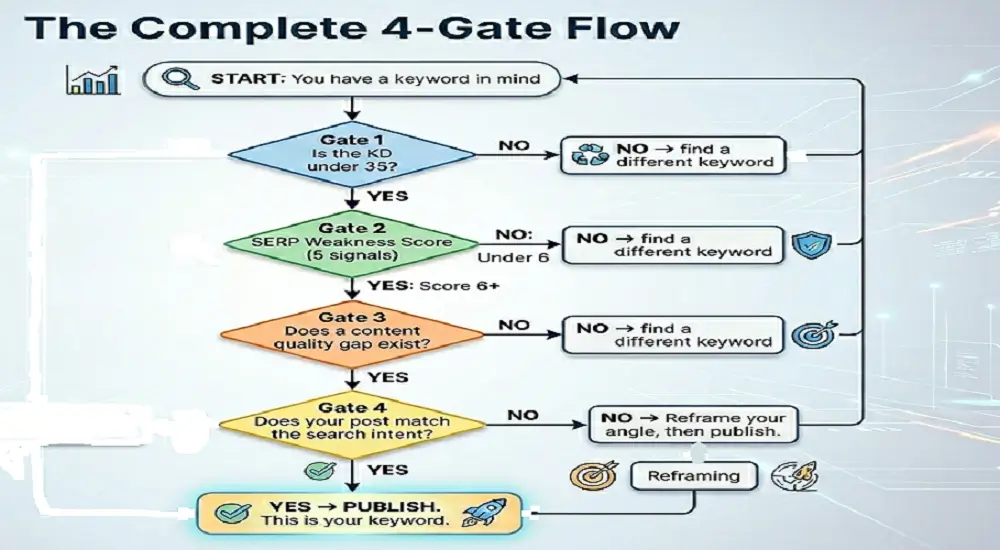
Gate 1 — Is the KD Under 35?
The first filter is this. When the KD exceeds 35, and you are less than six months old with your blog, you can move on. Thousands of superior keywords await. When the KD is less than 35, continue.
Gate 2 – Is SERP Weak?
Go to Google, enter your keyword, and literally see what is ranking. Your task is to decide whether those pages have a right to be there, or whether they are merely filling a blank that nobody has filled satisfactorily so far.
The SERP can be scored using five signals as follows. Be honest. This is less than five minutes.
| Semrush, Ahrefs, Forbes, and HubSpot absent from the top 5 | What to Look For | Points |
| Low authority sites | Reddit, Quora, or unknown blogs in the top 5 | +2 |
| Outdated content | Articles from 2021–2023 dominating the first page | +2 |
| Thin content | Posts under 1,200 words holding top positions | +2 |
| Intent mismatch | Semrush, Ahrefs, Forbes, and HubSpot are absent from the top 5 | +2 |
| No big brands | Semrush, Ahrefs, Forbes, HubSpot absent from the top 5 | +2 |
Score 6 or higher? The SERP is weak. Keep going.
The 5 Signals — What All Those Signals Are Really Saying to You.
Signal 1: Low Authority Websites in the Top 5
The top 5 positions have low authority websites. When the Reddit threads, Quora answers, or unknown blogs are sitting on page one, Google literally could not find something strong and dedicated to the content to serve the user, and so it turned to whatever was available. The door is open. The free MozBar Chrome extension is quick to use to check domain authority.
Signal 2: Outdated or Irrelevant Results
Old or obsolete results. That plain sight content gap is a first page full of 2021 or 2022 articles with no updates. Google favors new and correct information. In case no one has produced the final 2026 edition of this subject, you can be the one to do so.
Signal 3: Thin Content Holding Top Positions
Top positions are occupied by thin content. A 700-word post that lacks any headings, has no examples, and no data squatting in position two is not a strong post; it is a placeholder. It is ranked so because there is nothing that can be rated as better than it. Count fast words: Count words using the Word Counter Plus Chrome extension, which is free.
Signal 4: Intent Mismatch
Intent mismatch. When users who are searching for the best AI SEO tools receive generic definitions of what SEO is, that is a textbook mismatch. Google is yet to discover the appropriate content type. Whoever publishes it first wins.
Signal 5: No Strong Brands Dominating
There are no dominant, strong brands. Unless Semrush, Ahrefs, HubSpot, Backlinko, or Forbes are listed in the top five results, that SERP is literally open. Big brands crowd out smaller publishers on competitive keywords. In their absence, they have invited themselves.
Gate 3 – Is there a Content Quality Gap?
Take the five highest-ranking pages and read through them in a competitive manner. You are seeking all that they did not do well, all that they did not do at all, and all the questions they did not answer.
Symptoms of feeble material, your intro:
• Lack of definite structure; texts without a logical frame of headings.
No comparison tables, no data, no real-world examples.
- None of the FAQs cover follow-up questions.
- Data that ends in 2022 or before.
- Small words within the range of 500 to 1200 words with no actual depth.
When you see three or more of these in the top-ranking posts, you’re not looking at strong competition. You are looking at a hole that a well-researched, well-organized post can walk right through.
Indications of good content – know when to switch on:
- In-depth guidelines within the 2,000-4,000 word count.
- Comparison tables with actual data, which were updated within the past twelve months.
- Clear formatting and short paragraphs, clear structure of H2/H3.
- A frequently asked questions section that retrieves the People Also Ask results.
When most of the first five all appear to look like this, then go to another keyword. Weak SERPs are in abundance out there.
The 20-30 percent Better Rule: You do not have to write a perfect post. You require a post that is perceptibly superior to what is already in the first place – better organization, greater depth, newer information, and an easier reading experience. It only takes that to give Google the incentive to place you higher than they already.
Content Gap Checklist – before you write, run:
- Is my budgeted length of words 20-30% longer than the present number one score?
- Is there a comparison table that none of the top five include?
- Do I have up-to-date information with 2025 or 2026 data?
- Will I add a frequently asked questions section where I will be answering People also ask questions?
- Is my intended formatting easier and cleaner to look at than what is ranking?
- Do I provide an answer to the main question of the user more quickly and fully?
When you are able to cross all the boxes, your post has a structural advantage even before the first word is typed. Preparation, not luck.
Gate 4 – Does Your Post Correspond to the Search Intent?
A weak SERP and a definite content quality gap can be found. However, when your post does not coincide with what it is that the user in question came to Google to know, then it all does not matter.
Examine the SERP and determine what type of content is always rewarded in the top results. The trend is Google telling the user what he or she wants.
| Intent Type | Example Keyword | Best Content Format | Worth Targeting? |
| Informational | how to find low competition keywords | Step-by-step guide | Yes — your primary traffic zone |
| Commercial | best keyword research tools | Comparison list with pros and cons | Yes — your affiliate money zone |
| Transactional | Semrush pricing | Landing page or product review | Limited blogging opportunity |
| Navigational | Ahrefs login | Brand-specific page | Not useful for bloggers |
In the case of bloggers, the potential is in the informational and commercial intent keywords. Your audience is built by informational posts. Affiliate commissions are obtained through commercial posts, such as comparison guides, tool roundups, lists of the best, etc. You desire them both when it comes to content mix.
When you are about to write, you need to ask yourself one candid question; that is, should you get precisely what you came to get, on the spot, or should you just write?
- YES: Your angle is correct. Start writing.
- NO: Find out what they truly desire and reshape your post before you lay down a single word.
4-Gate Flow for Low Competitive Keywords
The Complete 4-Gate Flow for Low Competitive Keywords
Green all four gates? You’ve found a low-hanging fruit keyword. Stop second-guessing it. Start writing.
The whole procedure consumes less than ten minutes on each keyword after you have done it a few times. Run it on all your keywords, and you will never again spend three months on a post that had no realistic chance of ranking.
Frequently Asked Questions about Low Competition Keywords
What are low-hanging fruit keywords for SEO?
Low-hanging fruit keywords are search terms where the competition is genuinely beatable — not just because the KD score is low, but because the pages currently ranking are weak, thin, outdated, or mismatched with what users actually want. The formula is simple: low KD plus a weak SERP plus a clear intent match equals a low-hanging fruit keyword worth targeting.
What is a good keyword difficulty score for beginners?
For brand new blogs under three months old, targeting keywords with a KD of 0–20 gives you the most realistic shot at ranking. Blogs that have been publishing for three to six months can reasonably target the KD 21–35 range. Anything above 35 starts to favor sites with established domain authority. The 0–35 range is where most beginner and intermediate bloggers should be spending the majority of their time.
Can I rank for low competition keywords without backlinks?
Yes. When the pages currently ranking have low domain authority, thin content, and no meaningful backlink profiles of their own, you can outrank them through content quality alone. A well-researched post with clear structure, updated information, and proper intent alignment will outperform a poorly written post regardless of its backlink count — as long as the SERP is genuinely weak.
How do I find high-volume keywords with low competition for free?
Start with Google Keyword Planner. Enter your niche topic, filter by “Low” competition, and look for keywords with a monthly search volume above 1,000. Then install the free Keyword Surfer Chrome extension to see more precise estimates directly on the SERP. From there, scroll through People Also Ask boxes and autocomplete suggestions — both are goldmines most bloggers overlook entirely.
How to find long tail keywords with low competition?
Enter a broad seed keyword into Google Keyword Planner and filter for “Low” competition. Then use Google Autocomplete and People Also Ask to uncover specific, longer phrases. Filter your list to keywords with a KD below 35 and at least 500 monthly searches. Validate each one by checking whether the pages currently ranking are thin, outdated, or from low-authority sites — if they are, the keyword is yours to take.
Is KD 26 considered low competition?
Yes. A KD of 26 falls squarely in the “Easy” range, well within reach for a blog that’s been publishing for a few months. That said, KD 26 isn’t a guarantee. Run the full 4-Gate Filter — SERP weakness check, content quality gap analysis, and intent validation — before you commit to writing a post around it.
What is the best affordable keyword research tool?
For pure data depth at the lowest monthly price, Keysearch at $17 per month is the strongest option available. If a cleaner, more beginner-friendly interface matters more to you, KWFinder by Mangools at $29 per month is the natural alternative. Both are excellent choices depending on your priorities.
How long does it take to rank for low competition keywords?
Most blogs start seeing real movement within four to twelve weeks of publishing. The range depends on your domain age, publishing consistency, how well the post is optimized, and how weak the SERP competition actually is. Brand new sites sometimes take a bit longer. The important thing is that low competition keywords give you the most realistic shot at ranking within a reasonable timeframe.
Conclusion – Your Next Move Begins Now.
It is not difficult to find low competition keywords. It’s methodical.
The whole procedure in 3 steps is as follows: use the free or cheap tools in your budget to create a list of keyword candidates. Take each of them to the 4-Gate Filter to ensure that the opportunity is real. Before you type a single word, verify the intent match, so that each post you make is targeting what the user went to find.
No tricks. No quick fixes that cease operations once Google is updated. It is nothing but a process that you can repeat in all the content that you ever publish.
Assuming your current budget is zero, open Google Keyword Planner and install Keyword Surfer. The first really rankable keyword that you can find is in the next half an hour. Not tomorrow — today.
Once you are willing to go faster, the most sincere upgrade that can be offered is the Keysearch at $17 per month. Use it with LowFruits to validate SERP, and you have a complete system at less than $20 a month – a system that can stand all by itself against tools that cost five times as much.
And specifically, how to find low competition keywords with high traffic, the ones that have 1,000 to 3,000 monthly searches and with a SERP weak enough to crack without backlinks, it is specifically at this point that you want to get started. Filter by KD less than 30, volume greater than 500, run the SERP score, and check the intent. Keep on repeating until you have ten keywords that have gone through the four gates.
Then write. One keyword. This week.